Meta Advantage+ Catalog Ads Explained: What Changed and How Creative Works Now
 Nikolett Lorincz8 min read

You open Ads Manager to set up Advantage+ catalog ads, and the option you knew is gone. Meta has folded catalog ads into its sales campaigns, renamed the format "Products from your catalog" and switched some creative enhancements on by default.
Leave those settings unchecked, and Meta may adjust your product images, add product videos and pick the ad format without you noticing. Know what moved, and you decide what shoppers actually see.
This guide explains what changed, what Advantage+ now automates and which five things to check in your account. First, what does Advantage+ actually mean?
What is Meta Advantage+?
Meta Advantage+ is Meta's name for its automated ad products. In Meta's words, it is "a suite of products that can help you enhance and optimize campaign performance" through AI and automation.
It comes in two forms. The end-to-end campaigns, Advantage+ sales, app and leads campaigns, automate a whole campaign. The single settings, such as Advantage+ audience, Advantage+ placements and Advantage+ creative, automate one part of a campaign you otherwise set up yourself.
Meta introduced the Meta Advantage name in March 2022, when it gathered its automated ad products under Meta Advantage. Automatic placements became Advantage+ placements, and automated shopping ads became Advantage+ shopping campaigns.
What happened to Advantage+ catalog ads?
Meta no longer treats them as a separate ad type. Its catalog ads page now reads "Advantage+ catalog ads (now Products from your catalog)" and says your product catalog works across all sales campaigns, not just one ad format.
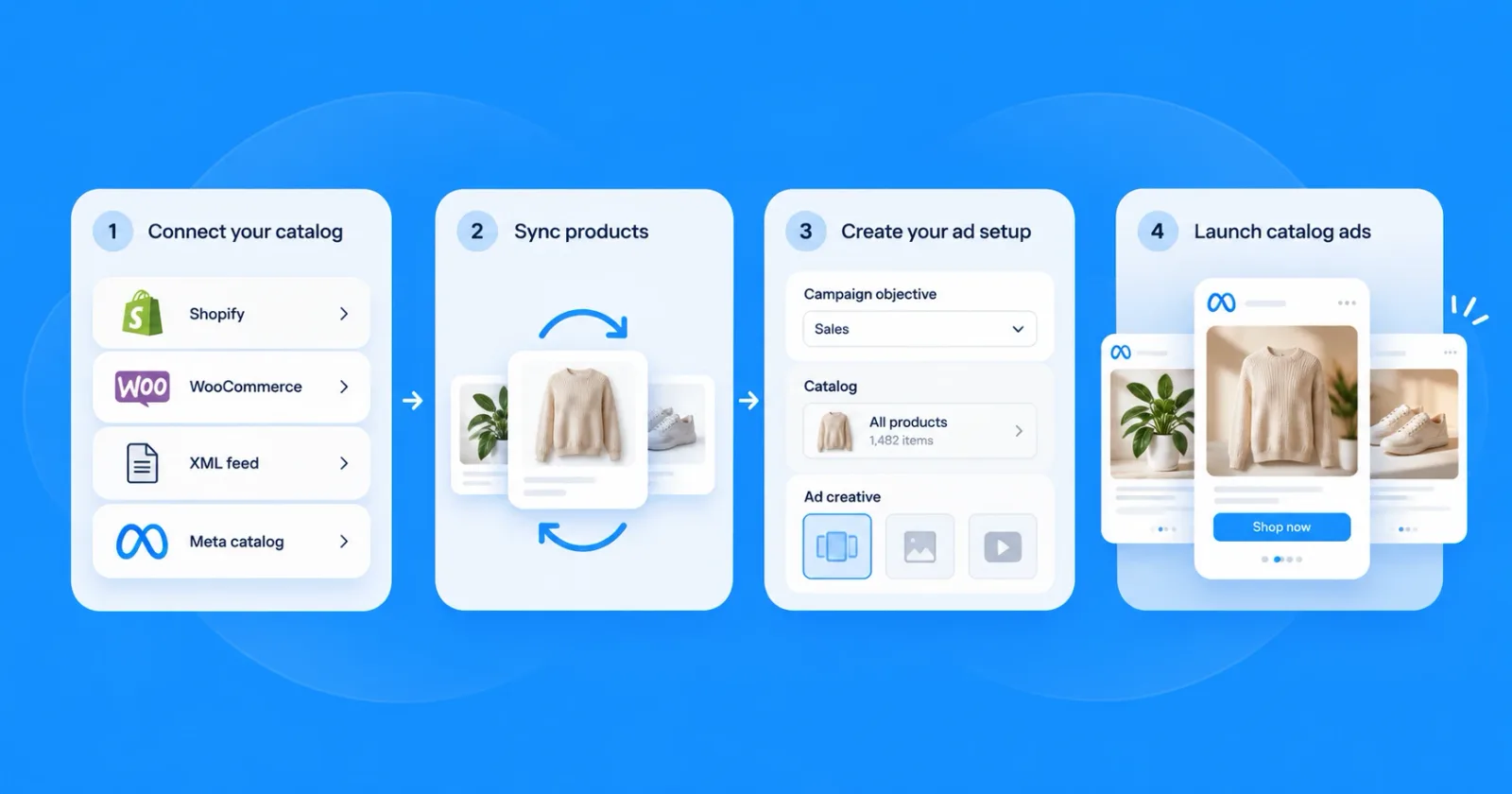
In practice, catalog ads are no longer a campaign type of their own. You create a sales campaign, select your catalog under Product data and connect it once at the campaign level, and Meta can then show products from it in that campaign's ads.
Meta announced the direction at Cannes in June 2026: product data is becoming "a foundational input across all Sales campaigns", so Meta can match products to people without advertisers splitting their campaigns by ad type.
A short history: from DPA to Products from your catalog
The format has had four names in just over ten years, which is why guides and Ads Manager rarely agree. The dates below come from Meta's own announcements where Meta published one.
| When | What changed | Source |
|---|---|---|
| February 2015 | Facebook launches dynamic product ads (DPA) | TechCrunch |
| January 2017 | Dynamic ads for broad audiences: catalog products shown to people who haven't visited your site | Jon Loomer |
| March 2022 | Meta Advantage gathers the automated ad products; automated shopping ads become Advantage+ shopping campaigns | Meta |
| Later | Dynamic ads are renamed Advantage+ catalog ads; Meta gives no date | Meta for Developers |
| January 2025 | The Audience Types option is removed from catalog ads with the sales objective | Social Media Today |
| February 2025 | Advantage+ shopping campaigns are renamed Advantage+ sales campaigns | Meta |
| September–October 2025 | Dynamic media, which mixes catalog product videos in with images, becomes the default for catalog ads created through the API | Meta for Developers |
| February 2026 | The old Advantage+ shopping campaign setup can no longer be created or updated through the API | Meta for Developers |
| June 2026 | Meta announces that product data becomes an input across all sales campaigns | Meta |
| Now | Meta's catalog ads page calls the format "Products from your catalog" | Meta |
Catalog ads vs Advantage+ sales campaigns
Catalog ads describe where the products in an ad come from: your catalog. An Advantage+ sales campaign describes how the campaign runs: Meta decides the audience, the placements and how the budget is spent.
When Meta renamed the campaign type in February 2025, it said the AI optimizations turn on when you use Advantage+ audience, placements and campaign budget. Switch one of those to a manual setting and the campaign is a sales campaign without the full Advantage+ setup, which can still use your catalog.
So the two don't compete: today your catalog runs inside a sales campaign, with Advantage+ fully on or partly on.
What happened to dynamic ads for broad audiences
Dynamic ads for broad audiences arrived in January 2017. They let Facebook show catalog products to people who had never visited the advertiser's site, based on what they browsed elsewhere.
That idea is now the default, not a separate option. In January 2025 Meta removed the Audience Types option from catalog ads with the sales objective, so prospecting runs through Meta's automated targeting.
Retargeting still works, but you set it up yourself. You build a catalog custom audience of people who interacted with products from a product set, which needs the Meta Pixel or the app SDK.
What Advantage+ creative does to your catalog ads
Advantage+ can change how your catalog products look in the ad, not only who sees them. Meta's Advantage+ creative page is direct about defaults: "Some enhancements may be turned on by default, but you can turn them off at any time."
These are the options that apply to catalog ads, with their default status from Meta's developer documentation and from a new sales campaign we checked in Ads Manager:
| Enhancement | What it does | Default |
|---|---|---|
| Image touch-ups | Adjusts catalog images to fit each placement | On by default |
| Dynamic media | Shows catalog product videos alongside images where supported | On in Ads Manager, and in the API since 2025 |
| Format automation | Meta picks carousel or collection for each impression | Used when you choose it |
| Single product media | Delivers an eligible catalog carousel as a single product image or video | On by default |
| Dynamic overlays | Adds catalog information, such as the price, as an overlay on the image | On in a new Ads Manager campaign; opt-in in the API |
| Dynamic partnership ads | Lets your partnership ads appear in a collection | Off; you opt in |
| Background generation | Generates a new background behind the product photo | Off in a new Ads Manager campaign |
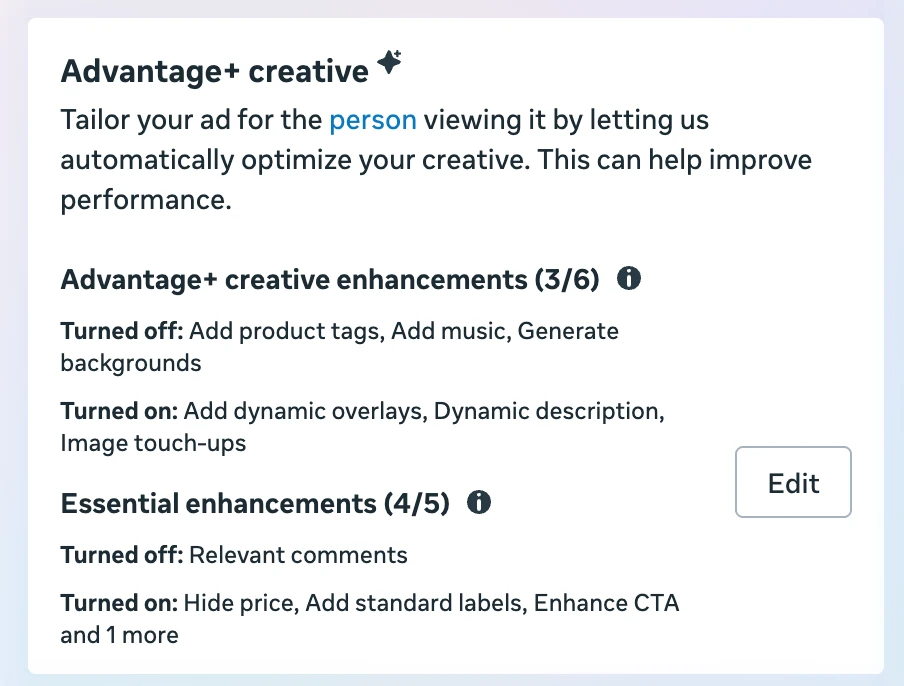
In Ads Manager the settings sit in an Advantage+ creative box at the ad level. In a new sales campaign we created in October 2026, without changing anything, three of six Advantage+ creative enhancements were on: dynamic overlays, dynamic description and image touch-ups. Product tags, music and background generation were off. A second group, essential enhancements, was on too, including hiding the price, standard labels and an enhanced call to action.
Meta's creative page also lists text generation, image expansion, image animation and video expansion. It doesn't say which of these apply to catalog ads, so check the creative settings of each ad.
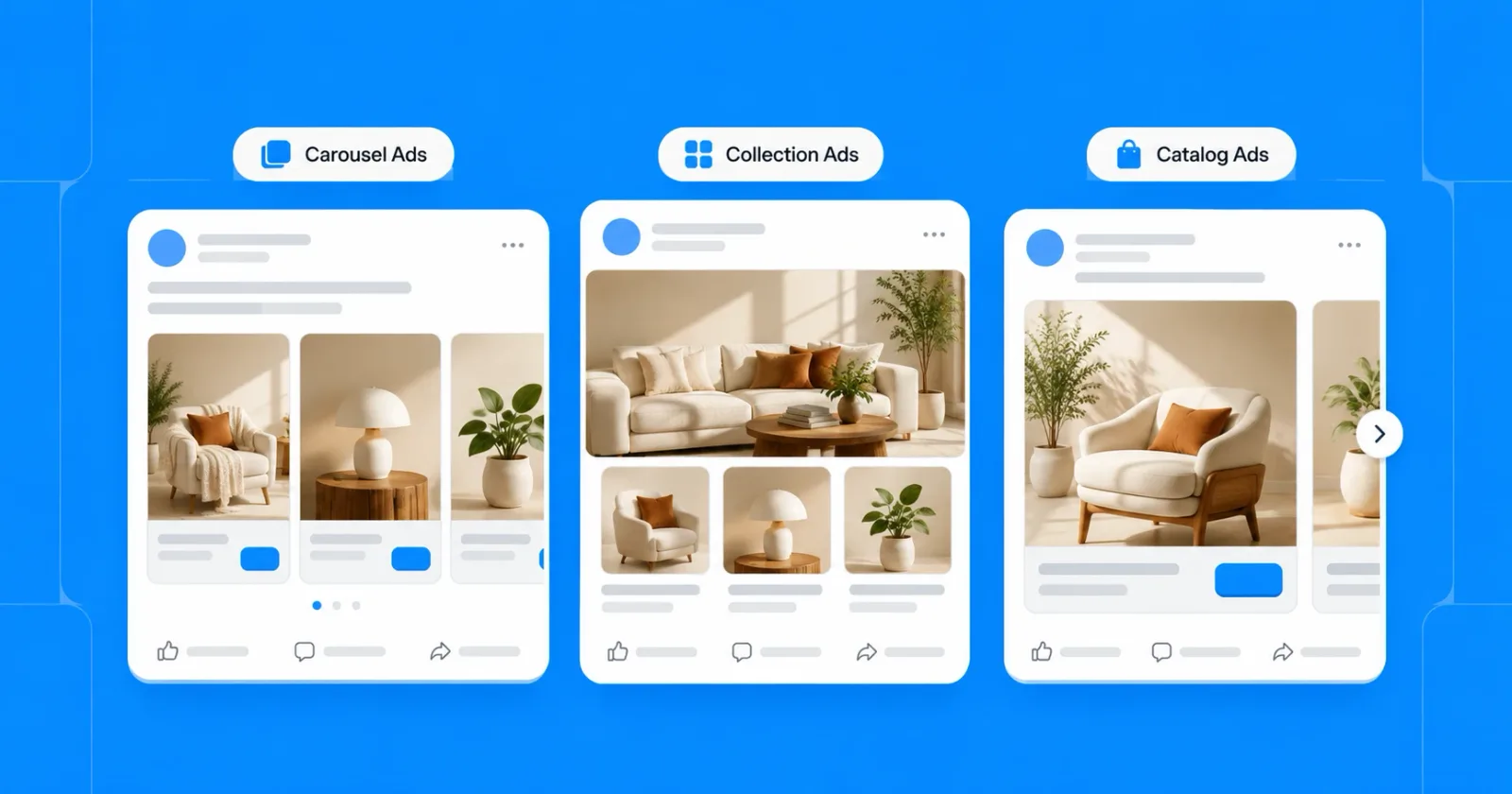
Format automation is the one that surprises people. When you turn it on, Meta "picks a format for each ad impression", so the same catalog ad can appear as a carousel to one person and a collection to the next (how the formats differ).
Should you leave the enhancements on?
Test them rather than assume either way. Meta itself notes that advertisers want product images that meet their brand guidelines, and a generated background or adjusted crop can drift from yours.
Check a few delivered ads in the preview for each placement before a big budget goes behind them. If an enhancement changes how the product looks, turn it off for that ad and compare results over the same period.
What Meta claims about performance
Meta publishes its own results for these features. They come from Meta's tests, and the pages don't show how each test was run, so read them as Meta's claims rather than benchmarks for your account:
| Feature | Meta's claim | Source |
|---|---|---|
| Catalog ads (Products from your catalog) | 17% lower cost per incremental conversion than ads with a single media item | Catalog ads page |
| Show products | 9.3% lower cost per acquisition, 10.8% higher conversion rate, 5.7% higher click-through rate | Catalog ads page |
| Catalog product video | 20% more conversions per dollar | Catalog ads page |
| Advantage+ sales campaigns | 20% improved cost per acquisition | Advantage+ page |
| Background generation for catalog ads | 2–3% lift in conversions | Advantage+ creative page |
The fair test is your own: run the enhancement on one ad set and off on another, with the same products and budget, and compare cost per purchase over the same period.
What to check in your account now
If your catalog campaigns were set up before these changes, five checks catch most of what moved:
- Campaigns built through the API. Meta's developer blog says the old Advantage+ shopping campaign setup can no longer be created or updated through the API, and that remaining ones will be paused in a later API version. If a tool or agency built yours that way, rebuild them as sales campaigns.
- Retargeting ad sets. If an ad set relied on the old Audience Types option, it now uses Meta's automated targeting. Add a catalog custom audience if you still want a ring-fenced retargeting budget.
- Creative enhancements. Open the creative settings of each active ad and note which enhancements are on. Image touch-ups and dynamic overlays were on by default in a new campaign we checked, dynamic media is on by default too, and all of them change what people see.
- Product sets. With Meta choosing products across the whole campaign, a product set is the main way to keep clearance stock, low-margin items or a brand you can't advertise out of an ad.
- Images per placement. Meta adapts one image to every placement unless you give it more. Extra 4:5 and 9:16 images in the feed give it better material for Feed, Stories and Reels.
What you still control
With Advantage+ on, Meta chooses the audience, the placements, the budget split and which products each person sees. Meta has said as much itself: at Cannes 2026 it wrote that advertisers want "more ways beyond product images on a white background".
That leaves you a short list:
- The product data. Titles, prices, availability and images in the feed decide what Meta can show at all.
- The product sets. Which products a campaign may promote, and which it may not.
- The creative. The images Meta puts in front of people, and which enhancements you leave on.
- The measurement. Which results you judge each set and creative by.
The creative is the item on that list with the most room. A catalog that only holds white-background packshots gives Meta nothing else to choose from, however good its targeting.
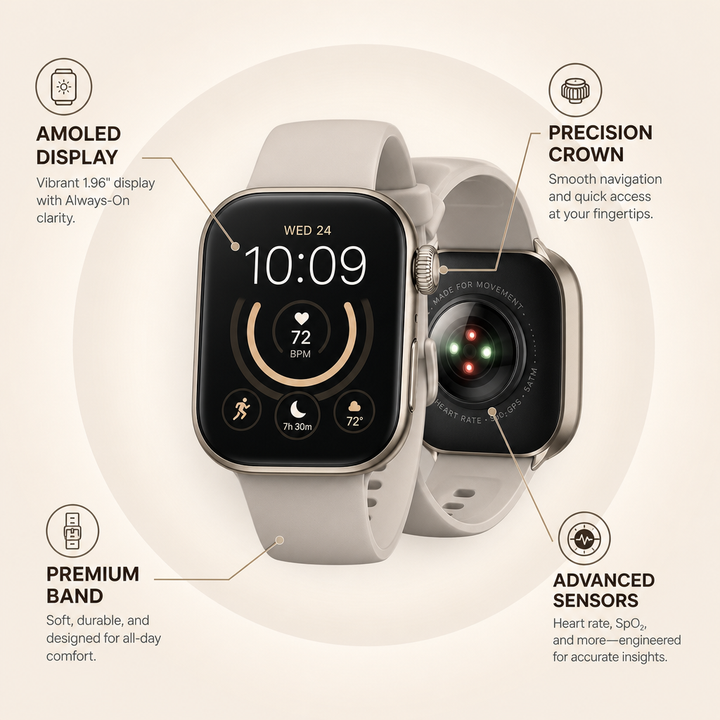
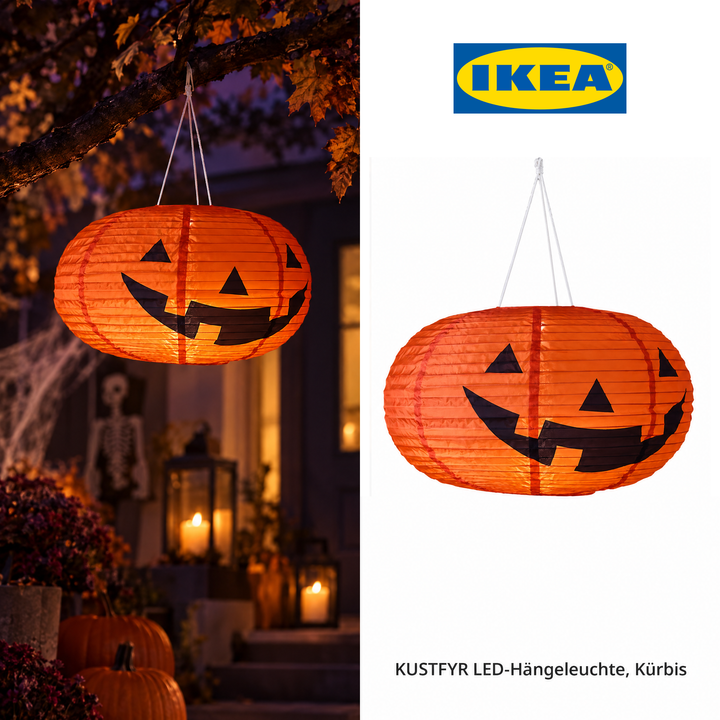
These four examples from the OptiQube ad library were generated from product feeds, each for a different kind of store:
Callout, electronics: a smartwatch with four labels for the display, the crown, the band and the sensors.
Lifestyle, home decor: a pumpkin lamp hanging on a porch at night, next to the product shot, for a Halloween week.
Callout, food: cookie dough with labels for taste and ingredients, and a short headline.

Lifestyle, luggage: a suitcase in an airport, next to a clean product shot.
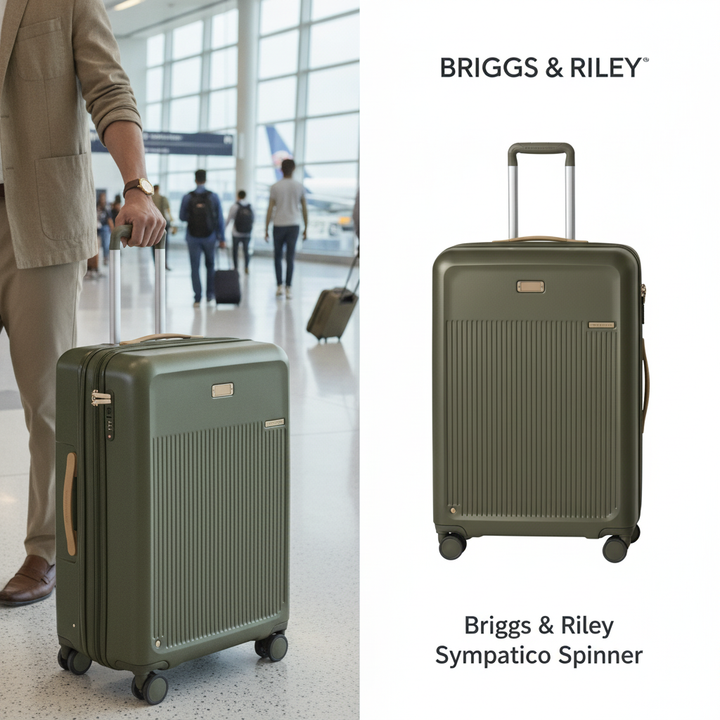
OptiQube, our product, generates creatives like these for every product in a feed and sends the approved ones to Meta as a paused campaign draft. Meta's own enhancements work on top of whatever image you give it, so a better starting image helps both.
Frequently asked questions
What is Meta Advantage+?
Meta Advantage+ is Meta's name for its automated ad products. Meta describes it as a suite of products that use AI and automation to improve campaign performance. It includes full campaign setups for sales, app and leads campaigns, and single settings such as Advantage+ audience, placements and creative that you can use in other campaigns.
What happened to Advantage+ catalog ads?
Meta folded them into its sales campaigns. Its catalog ads page now lists Advantage+ catalog ads as a former name and calls the format Products from your catalog. Your catalog works across all sales campaigns: you select it under Product data when you set up the campaign, instead of running catalog ads as a separate ad type.
Are Advantage+ catalog ads the same as dynamic ads (DPA)?
Yes. Facebook launched the format as dynamic product ads in 2015, later called it dynamic ads, then Advantage+ catalog ads, and now Products from your catalog. All four names describe ads Meta builds from your product catalog, choosing which products to show each person.
What is the difference between catalog ads and Advantage+ sales campaigns?
Catalog ads describe where the products in the ad come from: your catalog. An Advantage+ sales campaign is an automated campaign setup, renamed from Advantage+ shopping campaigns in 2025, in which Meta handles audience, placements and budget. A sales campaign can use your catalog, but the two are not the same thing.
What happened to dynamic ads for broad audiences?
Dynamic ads for broad audiences, launched in 2017, showed catalog products to people who had not visited your site. That idea is now built into sales campaigns. In January 2025 Meta removed the separate Audience Types option from catalog ads with the sales objective, so prospecting runs through Meta's automated targeting.
Can you turn Advantage+ off?
Partly. A sales campaign counts as Advantage+ when its audience, placements and campaign budget all use the Advantage+ settings, and you can change those to manual choices. Creative enhancements are separate: Meta says some may be turned on by default, but you can turn them off at any time.
Which Advantage+ creative enhancements are on by default?
For catalog ads, Meta's developer documentation lists image touch-ups as on by default, along with single product media for eligible carousels. Dynamic media, which mixes catalog product videos in with images, became the default in the API in 2025. The documentation lists overlays and partnership ads as opt-in, but in a new Ads Manager campaign we checked in October 2026, dynamic overlays were already on and background generation was off. Check the creative settings of each ad, because defaults can change.
Can catalog ads still retarget people who viewed a product?
Yes. Since Meta removed the Audience Types option in 2025, retargeting runs through catalog custom audiences: audiences of people who interacted with products from a product set in your catalog. They need the Meta Pixel or the app SDK, and you add them to the ad set yourself.
Start with the creative
Advantage+ decides who sees your products and where. What they look like is still your call.
Browse 250+ catalog ad examples in the ad library, or start for free and generate creatives from your own product feed.