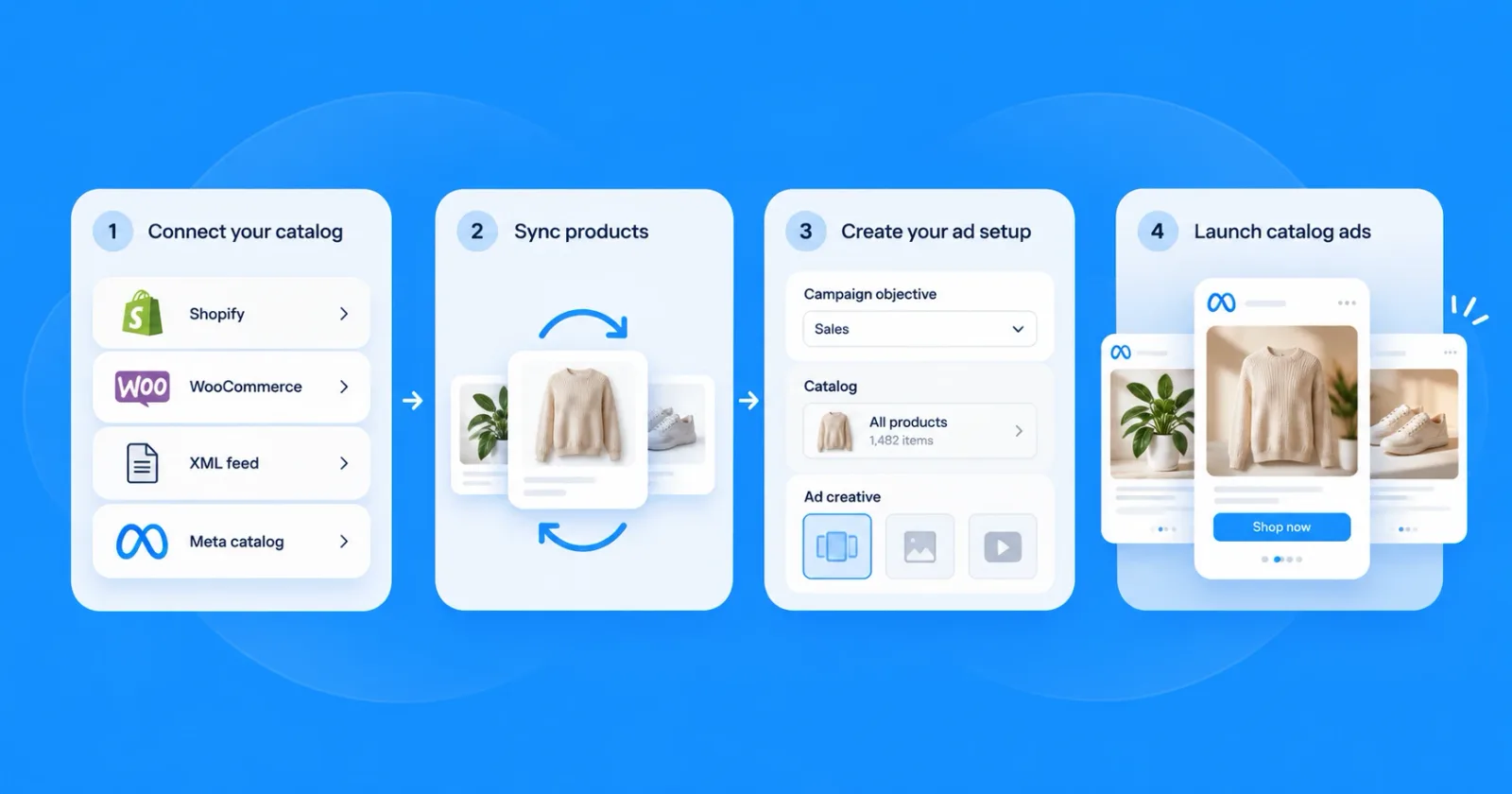
Meta Catalog Ads (Dynamic Product Ads): The Complete Guide for 2026
 Nikolett Lorincz9 min read

Scroll your Facebook feed and you'll see it: product after product on a plain white background. Many of those are catalog ads, built from a store's product feed, so they show the same packshot as every competitor and marketplace.
That look costs sales: in one small test, catalog ads with callout labels brought 42% more purchases than the white-background version.
This guide shows how Meta catalog ads (formerly dynamic product ads) work, what you need to run them and five habits that make yours stand out. First, what exactly is a catalog ad?
What are Meta catalog ads?
Meta catalog ads are ads that Meta assembles from a product catalog instead of from a single uploaded image. You connect a feed with your products, and Meta decides which products to show each person and builds the ad from that product's image, title and price.
One campaign can promote thousands of products without a separate ad for each one. In Meta's words, the format lets you "promote relevant items from an entire catalog across any device".
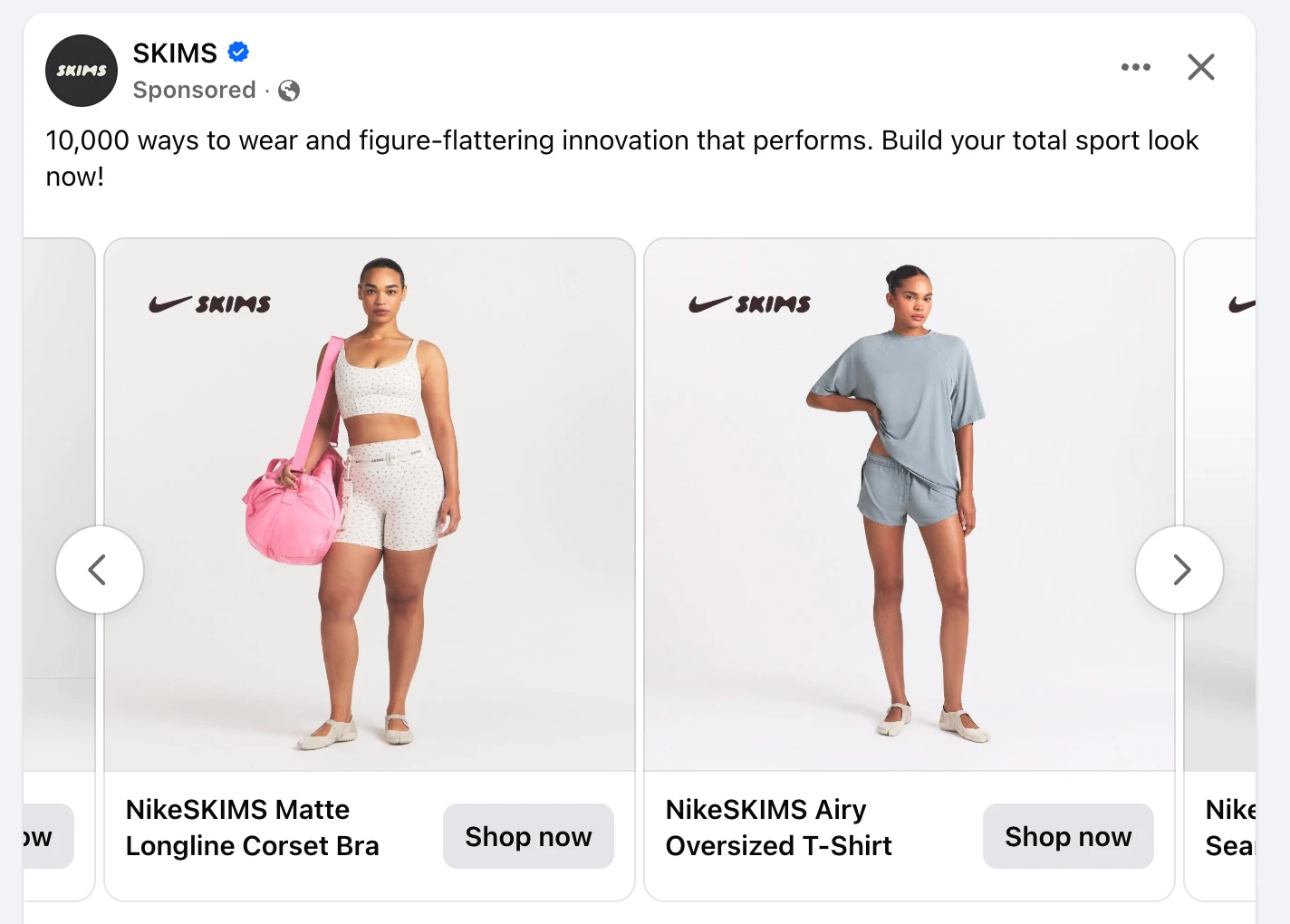
This is what that looks like in the feed. In a carousel like this SKIMS ad, every card is a different product with its own photo, name and Shop now button, and the text above stays the same for all of them.
Catalog ads can also put each product into a template. D.Franklin's ads fill the same layout with each product's photos and name, add the same SUMMER SALE badge to every card and show a "Price drop" line under the product name.

Screenshots from the Facebook feed.
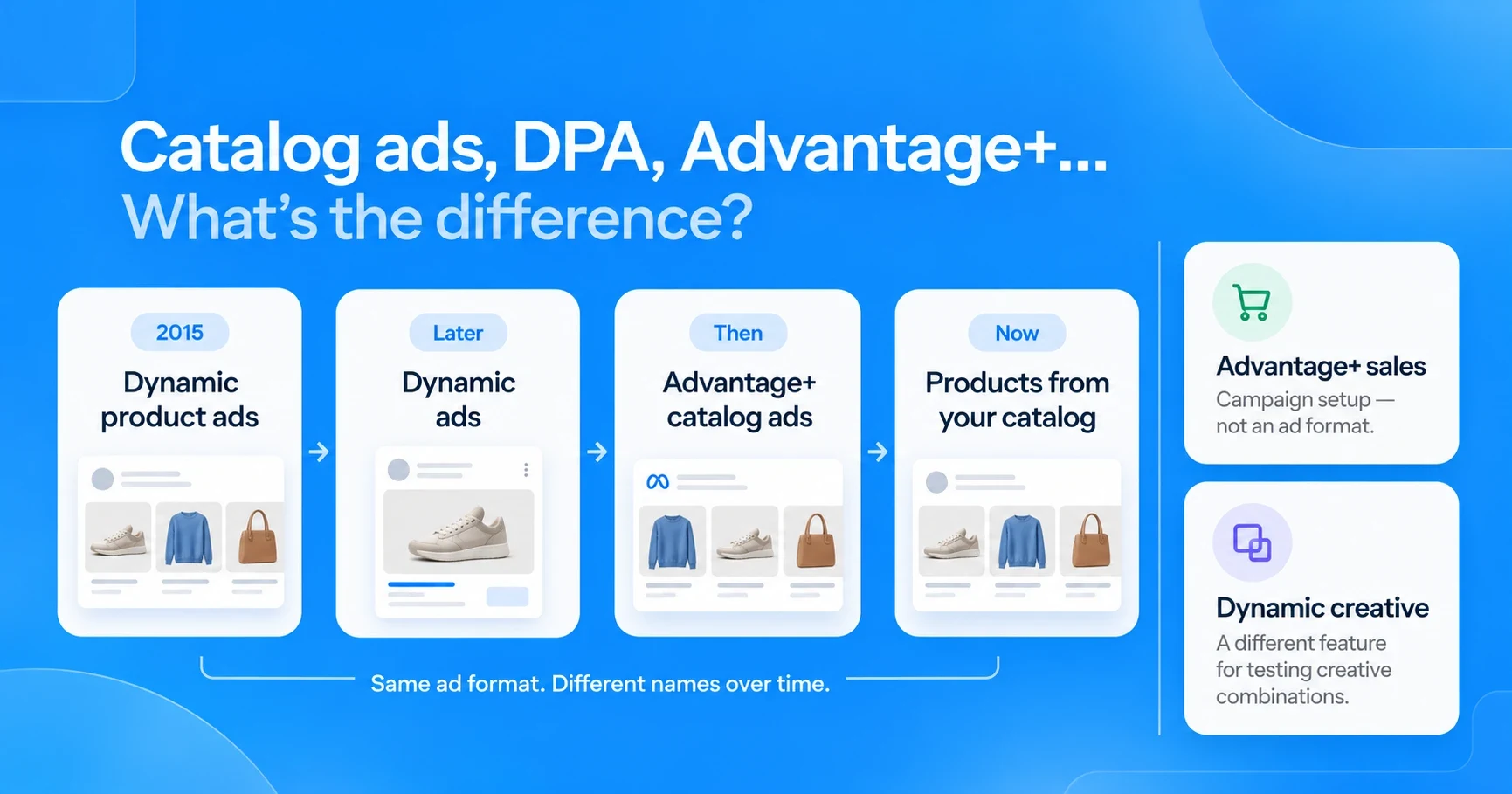
The names are the confusing part. "Dynamic product ads", "DPA", "dynamic ads", "Advantage+ catalog ads" and "Products from your catalog" all describe the same format, and the next section sorts them out.
Catalog ads, DPA, Advantage+ catalog ads, Advantage+ sales: what's the difference?
Facebook launched the format as dynamic product ads in 2015, later shortened the name to dynamic ads, then called it Advantage+ catalog ads, and now calls it Products from your catalog. Two other names sound similar but mean something else.
| Name | What it is | Where you still see it |
|---|---|---|
| Dynamic product ads (DPA) | The original name of ads built from a product catalog | Shorthand, often for catalog retargeting |
| Dynamic ads | The later, shorter name for the same format | Older guides and help articles |
| Advantage+ catalog ads (now Products from your catalog) | The previous name; Meta now calls it Products from your catalog, and you pick the catalog inside a sales campaign | Meta's developer documentation and many current guides |
| Advantage+ sales campaigns | An automated campaign setup, renamed from Advantage+ shopping campaigns in 2025; it can run catalog ads but is not an ad format | Campaign creation in Ads Manager |
| Dynamic creative | A separate feature that tests combinations of images, headlines and text in one ad; it does not use a catalog | Creative testing |
The Advantage+ sales rename came in early 2025; as Jon Loomer reported, Meta said the new name would "better reflect the full range of advertisers that can benefit from this product". In this guide, "catalog ads" means the ad format, whatever campaign it runs in.
How Meta catalog ads work
Meta's developer documentation describes the setup as three parts: a catalog feed with your product images, descriptions and prices; the Meta Pixel or app events to measure what people do; and the ads that show relevant items from the catalog.
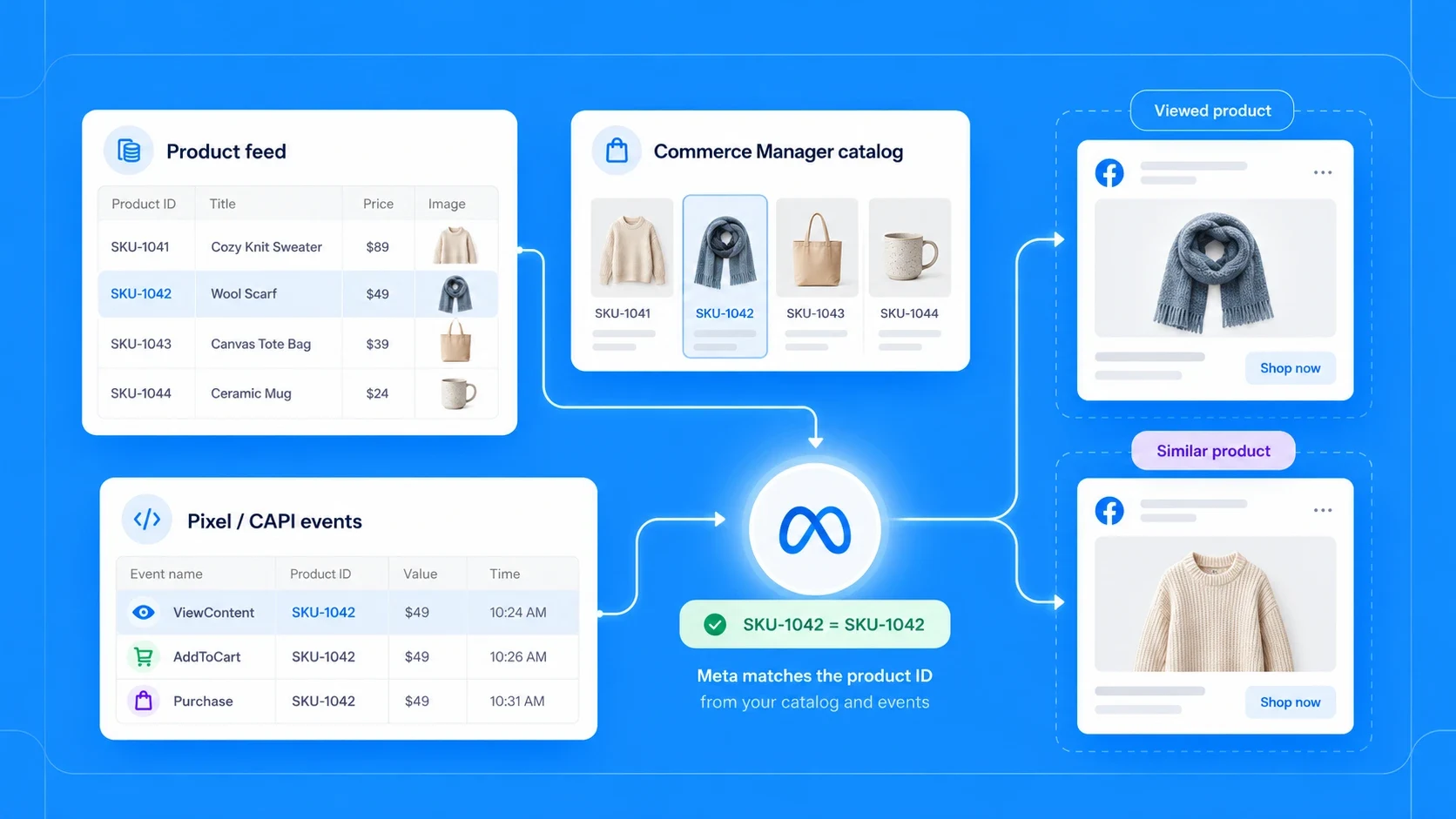
When someone views a product on your site, the pixel or the Conversions API reports the product's ID to Meta. Because the same ID sits in your catalog, Meta knows which product it was and can show it, or similar ones, in an ad later.
You can also group products into product sets, for example by category, price range or margin. A set decides which part of the catalog a campaign is allowed to promote.
Ad text that changes with the product
The text around a catalog ad can change with the product too. When you write the primary text or headline, you can insert catalog fields such as the product name or price, so one line of copy works for every product the ad shows. In Ads Manager, the + next to the field lists the catalog fields you can insert:
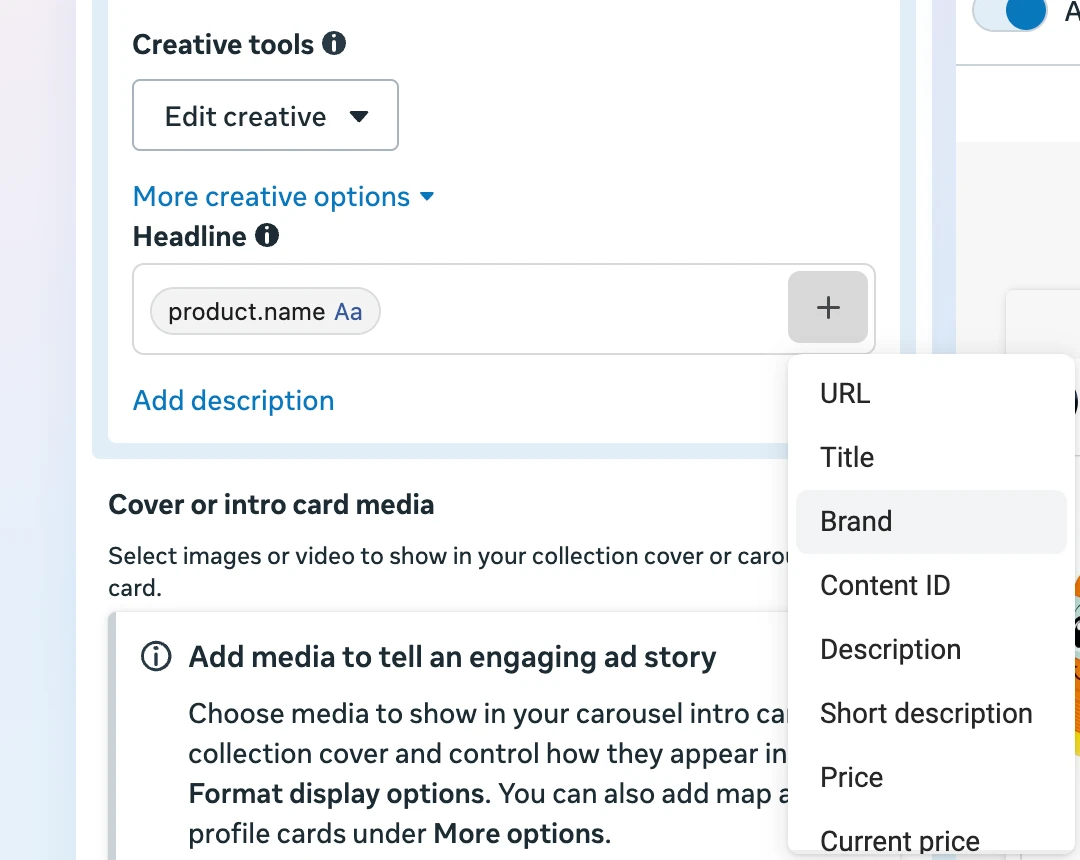
Keep that text short and let the image carry the product. Long, specific copy reads oddly when Meta swaps in a product it was not written for.
Broad audiences vs retargeting
Catalog ads run in two modes. Retargeting shows people the products they already viewed or added to their cart, which is where the format started.
Broad audiences show catalog products to people who have not visited your site, based on what Meta predicts they will like. Many advertisers run both, with separate budgets, because the two audiences behave differently.
What you need before you start
Meta's getting-started guide lists a Facebook Page, an ad account and a catalog; your store has to send event data too. In practice the list looks like this:
- A Facebook Page for your business and an ad account with a payment method.
- A catalog in Meta's Commerce Manager, filled from a product feed: a file, a scheduled feed URL or a platform integration such as Shopify or WooCommerce.
- Complete product data for every item: an ID, title, description, price, availability, condition, brand, product link and image. Meta's catalog specifications list the full set of required and optional fields.
- The Meta Pixel or the Conversions API on your store, sending standard events (ViewContent, AddToCart, Purchase) with the product IDs.
- Matching IDs: the IDs your pixel sends must be the same as the IDs in the catalog. Commerce Manager shows whether your events match catalog items.
The step-by-step setup, from catalog to the first live campaign, gets its own guide: how to set up Meta catalog ads.
Where catalog ads run and which formats they use
Catalog ads run across Facebook and Instagram. Meta's documentation lists Instagram Feed, Stories and Explore as supported Instagram placements, and you can let Meta choose placements automatically.
The ad itself can be a single product image, a carousel of several products or a collection with a cover and product tiles underneath. Each format suits a different goal, and which one to use when has its own guide.
Video is part of the format too. According to Meta's developer documentation, Advantage+ catalog ads "deliver catalog product videos by default" when the catalog contains them, and advertisers can opt out.
Why most catalog ads look the same
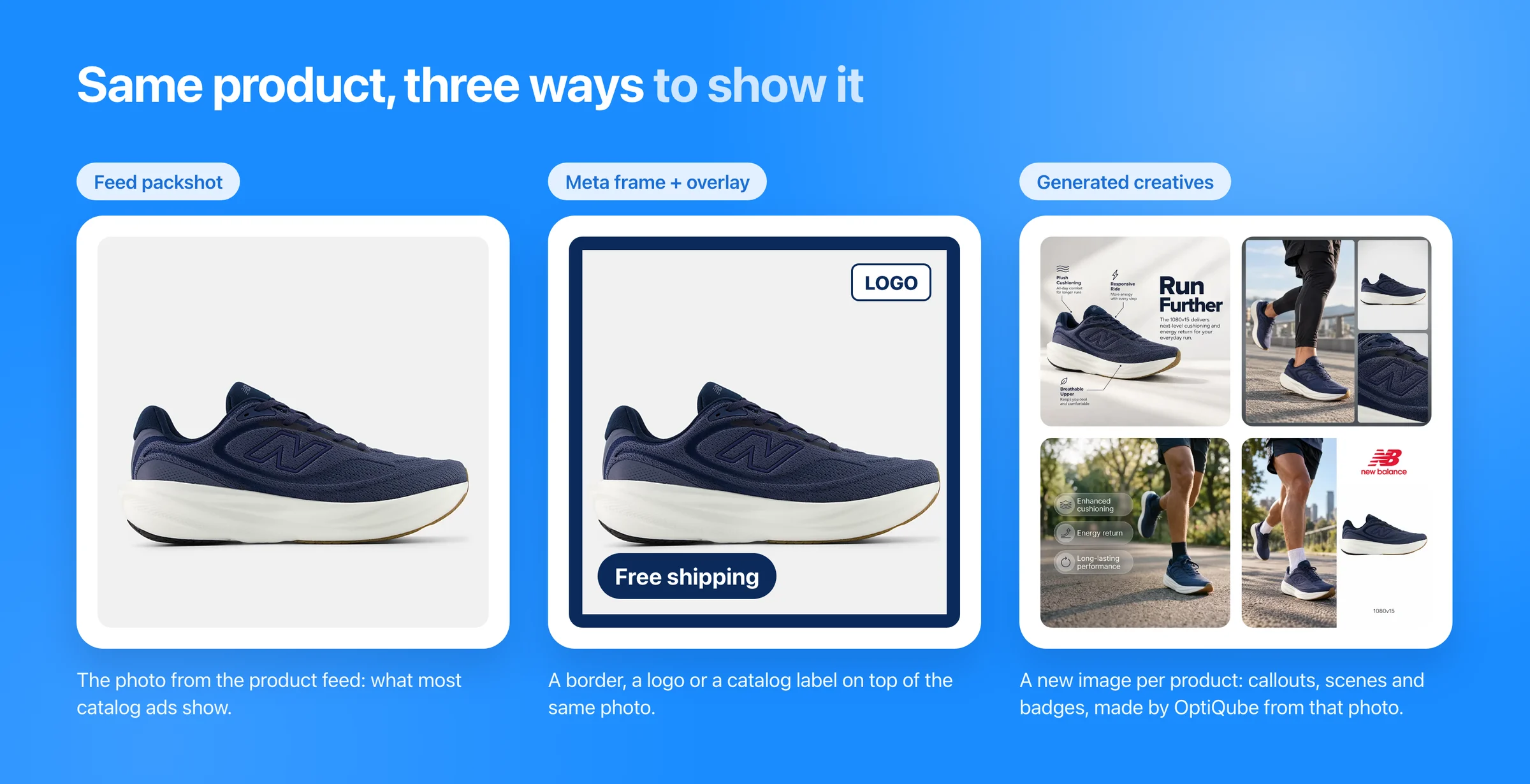
Most catalog ads show the same image the product page uses: a packshot on a white background. Many stores selling the same brands use the same manufacturer photos, so shoppers scroll past near-identical ads from different shops.
The white background is not a mistake in the feed; it is what most feeds contain. The trouble is that it reads as a listing thumbnail, not as an ad, and gives nobody a reason to stop.
Meanwhile, Meta's automation has taken over most of the other decisions. With broad audiences, automatic placements and Meta picking the product, the creative is the main variable you still control.
Frames and overlays vs generated creative
Meta offers two built-in ways to dress up catalog images. A frame is one image, such as a border or a logo, laid over every product photo, and dynamic overlays add the price, a strikethrough price, the percentage off or free shipping from your catalog data. D.Franklin's template above follows the same idea: the layout and the sale badge stay the same on every card, and only the product changes.
Both sit on top of the same product photo, so each ad still reads as a product listing, now with a border or a label. A generated creative changes what is around the product instead: each one gets its own scene, badge or callout.
These four examples from the OptiQube ad library show the four main styles, each generated from a product feed:




- Lifestyle: the product in a real scene, here a rugby shirt worn outdoors with a flat shot and a detail crop beside it.
- Callout: short labels pointing at what matters, here the ingredient and its percentage on a serum.
- Badge: benefits or an offer on top of the image, here three fabric benefits next to an activewear model.
- Mixed: a scene and a badge together, when there is a story and a reason to buy at the same time.
How these examples were made
Each example started as a plain product photo in a store's feed. OptiQube, our product, reads the feed and generates a creative for every product in the style you pick, without changing how the product looks.
You review the creatives, and the approved ones go to Meta as a paused campaign draft, so nothing spends until you switch it on. OptiQube works with Meta only, and it is one way to get here; a designer with time, or a design tool and a lot of patience, is another.
How to make catalog ad creative stand out
Better catalog creative comes down to a few habits. Each one below links to an example from the ad library.
1. Put the product in context
A garment on a body or a cream open on a bathroom counter answers "what is it like" before the shopper taps.

2. Call out what the photo can't show
Warmth, an ingredient or a hidden pocket is invisible in a thumbnail, so short labels pointing at the product do that job.

3. Put the offer on the image when there is one
In a promo week, a sale headline next to the product gets read before the ad copy does.

4. Change the scene with the season, not the product
The same pair of jeans can run in an autumn street and a Christmas living room, so the ad looks current without a new photoshoot.


5. Use the right shape for each placement
Square (1:1), like the example below, is the safe default across placements; portrait (4:5) fills more of the mobile feed, and 9:16 is built for Stories and Reels.

Industry collections show the same habits applied to one category, for example clothing and fashion catalog ad examples and beauty and skincare catalog ad examples.
How to measure catalog ads
Judge catalog ads by product set and by creative, not only by campaign. A campaign-level ROAS can hide a set that sells well next to one that only spends.
Watch the same few numbers each time: purchases, cost per purchase (CPA), purchase ROAS, click-through rate and frequency. Rising frequency with falling click-through usually means people have seen the same images too often and the creative needs a refresh.
Give new ads time before you judge them. After a launch or a major edit, Meta's delivery goes through a learning phase, and results in the first days are noisy; compare creatives over the same period, not day by day.
To test creative, keep everything else equal. That is how the agency Clickbrains tested OptiQube creatives for Delifarm, a Hungarian agricultural and pet supply store: same products, same daily budget, three ad sets, 8–18 June 2026.
The ad set with callout creatives brought 44 purchases against 31 for the plain white-background ads, 42% more, at a cost per purchase of $1.22 instead of $1.73, 29% lower. It was a small test, $5 a day per ad set, so treat it as a direction to test in your own account rather than a benchmark.
When catalog ads are not worth it (yet)
Catalog ads need two things to work: enough products for Meta to choose from and enough traffic for the pixel to learn who likes what. With a dozen products and a few hundred visitors a month, Meta has little to personalize.
Research points the same way. A study of one small online business found that for niche products, manually optimized Instagram ads drove more purchases, while dynamic product ads did better on reach and site visits.
A weak feed is the other reason to wait. Missing prices, broken links or low-resolution images show up in every ad at once, so fix the feed first.
Frequently asked questions
Are dynamic product ads the same as Advantage+ catalog ads?
Yes. Facebook launched the format as dynamic product ads in 2015, later shortened the name to dynamic ads, then called it Advantage+ catalog ads, and now calls it Products from your catalog. All these names describe ads that Meta builds from your product catalog and personalizes for each person.
What is the difference between catalog ads and Advantage+ sales campaigns?
Catalog ads are an ad format: Meta builds each ad from your product feed. Advantage+ sales campaigns, renamed from Advantage+ shopping campaigns in 2025, are an automated campaign setup that controls budget, audience and placements. A sales campaign can run catalog ads, but the two are not the same thing.
Do Meta catalog ads work for small stores?
They work best when you have enough products for Meta to choose from and enough site traffic for the pixel to learn. A store with a handful of products and little traffic often does better with a few hand-made ads first, then catalog ads once the feed and the traffic grow.
How much do Meta catalog ads cost?
There is no separate price for catalog ads. You pay for delivery like any other Meta ad, through the auction, and set your own daily or lifetime budget. What you pay per purchase depends on your audience, your offer and how well the creative makes people stop scrolling.
Do I need the Meta Pixel for catalog ads?
You need the Meta Pixel or the Conversions API, or both. They report which products people view, add to cart and buy, and the product IDs they send have to match the IDs in your catalog. Without that match, Meta cannot connect activity on your site to the products in your ads.
Can catalog ads run on Instagram?
Yes. Meta supports catalog ads on Instagram Feed, Stories and Explore, as well as on Facebook. You can let Meta choose placements automatically or pick them yourself, and the same catalog feeds both apps.
Can I change the creative of catalog ads, or am I stuck with product photos?
You can change it. Meta's own tools add a frame or a price overlay on top of the product photo, and you can also supply your own image per product in the feed. Creative tools such as OptiQube, our product, generate a new scene, badge or callout for every product from the feed.
Do Meta catalog ads use video?
They can. According to Meta's developer documentation, Advantage+ catalog ads show catalog product videos by default when your catalog includes them, and advertisers can opt out. If your catalog has no product videos, the ads use images.
Start with the creative
Your feed and your pixel decide which products Meta can show. The creative decides whether anyone stops to look.
Browse 250+ catalog ad examples in the ad library to see what generated catalog creative looks like, or start for free and generate creatives from your own product feed.