Ad Creative Automation: What It Is and How Ecommerce Brands Use It
 Nikolett Lorincz8 min read

A store with 500 products and four seasons a year needs thousands of ad images to keep its Meta ads fresh. Nobody designs that many by hand, and most stores don't try: they run the same feed photo in every catalog ad until it stops working.
Creative automation is the answer most tools give, but the term covers very different things. Some tools resize one design into ten formats, some paint the same frame on every product, and some generate a new image for each one. Lumping them together makes it hard to pick the one your catalog actually needs.
This guide explains what ad creative automation is, the four types ecommerce teams use for Meta catalog ads, what Meta already does for you, and a step-by-step workflow for automating creative across a product catalog.
The short answer: ad creative automation is software that produces ad images or videos from your product data instead of designing each one by hand. For an ecommerce catalog it can sync prices and stock, apply one design to every product, or generate a new image per product. People still pick the style, approve and test.
What ad creative automation is
Creative automation means producing creatives from data and rules rather than one at a time. You decide the look once, connect the data, and the software turns out the versions: every size, every product, every season.
Ad creative automation is the same idea applied to paid ads. It is not campaign automation, which handles budgets, bids and audiences, and it is not the same as generative AI. Plenty of creative automation uses no AI at all and simply fills a fixed layout with product names, prices and photos. Generative tools are one type among several, although the two increasingly meet in the same workflow.
Why ecommerce teams automate creative
The math is the reason. A catalog multiplies every creative decision by the number of products, then by the number of placements, then by how often the creative has to change.
- Many products. A designed ad per product is realistic for ten products, not for a thousand.
- Many formats. Feed, Stories and Reels each favor a different shape.
- Fast wear-out. The same people see the same images again and again, especially in retargeting, and performance drops. Our guide to creative fatigue on Meta shows how to spot it.
- Testing. Finding what works means running several versions side by side, as our guide to Meta ad creative explains, and every test needs new creative.
Without automation, most catalogs fall back on the feed photo, usually a product on a white background, in every ad.
The four types of ad creative automation
The tools on the market fall into four types. They automate different steps, and most stores end up combining two or three.
| Type | What it automates | What stays manual | Best for | Limit |
|---|---|---|---|---|
| Feed sync | Products, prices, stock and new arrivals flow from your store to the Meta catalog | The images themselves | Keeping catalog ads accurate | The ads still show the feed photo |
| Layout-based automation | One design (frame, badge, price tag) applied to every product | Designing the layout and its rules | A consistent branded look across a large catalog | Every product gets the same treatment on the same photo |
| Meta's built-in tools | Frames, overlays, image expansion, generated backgrounds and text, format and product choice | Deciding which options to allow | Quick wins inside Ads Manager | Limited control over style and no approval step for each product |
| Generative creative per product | A new image for each product: a scene, callouts, an offer | Choosing the style and offer, reviewing the output | Fresh, varied creative across a whole catalog | Output needs checking for product accuracy and brand fit |
Feed sync is the foundation. A platform integration or a scheduled feed keeps the catalog current, so a sold-out product stops showing and a new one appears without anyone touching the ad. Our catalog ads setup guide covers the options. On its own, though, it changes nothing about how the ads look.
Layout-based automation is what most "creative automation" articles describe: build a design once, map feed fields to it, and render it for every product. It works well for consistent branding, price callouts and sale labels. Its weakness is that the photo underneath stays the same, so a thousand products still look like a thousand packshots with a border.
Meta's built-in tools are covered in the next section.
Generative creative per product gives each product its own image: the product in a room, on a trail or in a gift scene, with callouts or an offer. This is the newest type and the one that changes the ad most, because it replaces the feed photo instead of decorating it. It also needs the most review, since a generated image can get a detail of the product wrong.
What Meta already automates (and what it doesn't)
Before adding a tool, check what Meta does on its own. A lot of creative automation is already built into Ads Manager and Commerce Manager:
- Frames and dynamic overlays add a border, a logo or the price, discount or free-shipping label to every product photo in a catalog ad.
- Generative AI features. In October 2023, Meta announced Background Generation, Image Expansion and Text Variations in Ads Manager: new backgrounds for product images, images adjusted to other aspect ratios such as Feed or Reels, and alternative versions of your ad text.
- Advantage+ creative enhancements adjust images, add overlays and pick a format for each impression; several are on by default. Our guide to Advantage+ catalog ads lists them and what to check.
- Product choice. In a catalog ad, Meta decides which products each person sees.
What Meta doesn't do is your creative strategy. It won't decide which style fits your brand, write your offer or give every product a new scene that you have reviewed before it runs. In the same announcement, Meta acknowledged there was still work to do on outputs customized to each brand's voice and visual style. That gap is where the other types come in.
How to automate creative for a product catalog, step by step
Here is the workflow for automating catalog ad creative on Meta, from feed to live campaign. The screenshots come from OptiQube, our product, in a test account; other tools follow similar steps.
The same workflow is in this two-minute video, on the same store and the same bag, from one product photo to one style on three products:
1. Get the feed right. Connect your store or feed so products, prices and stock stay in sync. Good source photos matter: every automated creative starts from them.
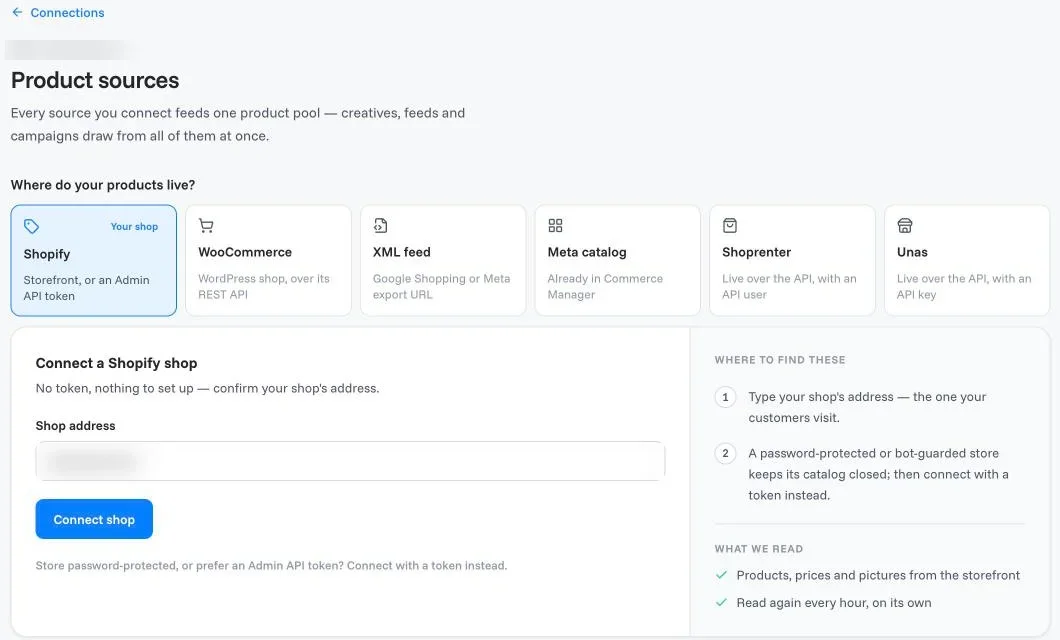
2. Choose a style and an offer. Decide what the ads should look like (a lifestyle scene, feature callouts, a benefit badge, a seasonal look) and whether they carry an offer. Try the styles on one product first.

3. Generate across the catalog. Once one product looks right, apply the same style to the rest. This is where automation saves the most time: the hundredth product takes no longer than the first.
4. Review before anything goes live. Compare each creative with the product photo it was made from. Check the product's shape, color and details, any text on the image, and that claims and prices are correct. Reject or redo what doesn't pass.

5. Send it to Meta as a draft. The approved creatives go into a catalog campaign that starts paused, so nothing spends until you check the setup in Ads Manager and switch it on.
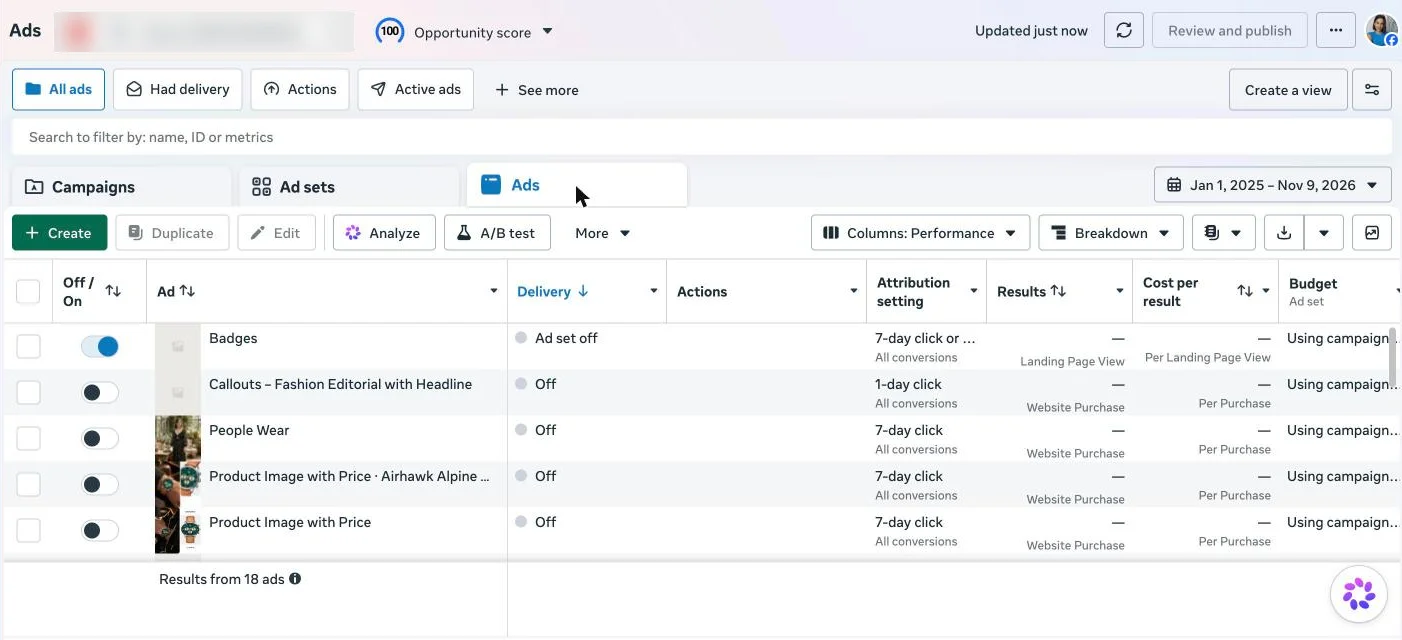
6. Test against what you run today. Put the new creative against your current catalog ads with the same audience and budget, ideally as an A/B test, and compare cost per purchase.
7. Refresh on a schedule. New products enter through the feed sync; new seasons and offers get a new style. Watch frequency and cost per result, and replace creatives before they wear out.
What stays human
Automation takes over the repetitive part. The decisions stay with you:
- The style and the brand rules. Which looks fit your brand, which colors, fonts and claims are allowed.
- The offer. What you are selling this month and how you say it.
- Approval. Someone checks the output before it goes live. In OptiQube, the creatives you approve go to Meta as a paused campaign draft.
- The test plan. What you compare, for how long, and what counts as a win.
- Meta's settings. Which Advantage+ enhancements to allow on top of your own creative, since some can change the image after you have approved it.
Common pitfalls
- Bad source photos. Low-resolution, cropped or inconsistent feed images produce weak creatives, whatever the tool.
- Off-brand output. Without clear rules, automated creative drifts from your look. Set the style before you scale.
- Versions that look alike. Ten creatives with the same photo and a different border are one creative to the viewer. Meta's Help Center asks for a new image or video that is "materially different" when an ad wears out.
- Stacked automation. Meta's enhancements can add overlays or crop images on top of creative you already designed. Review what is switched on.
- No test plan. Automation makes versions cheap; without a test you won't know which ones work.
How to choose a creative automation platform
Creative automation tools, platforms and software range from feed managers with a design editor to generative tools built for catalogs. Five questions narrow the choice:
- Feed handling. Does it connect to your store or feed directly, and does it keep prices, stock and new products in sync?
- Output quality. Does the creative look like something you would design, and does the product stay accurate?
- Brand control. Can you set styles, fonts, colors and claims, and review every creative before it runs?
- Meta integration. Does the output reach Meta as a catalog campaign, or do you upload files by hand?
- Price and scale. Does the cost grow with products, with creatives or with ad spend, and does that fit your catalog?
Our comparisons set OptiQube against other tools on these points.
Results are the final test. In the Delifarm case study, the agency Clickbrains replaced the store's white-background photos in its catalog ads with generated creatives and ran them side by side.
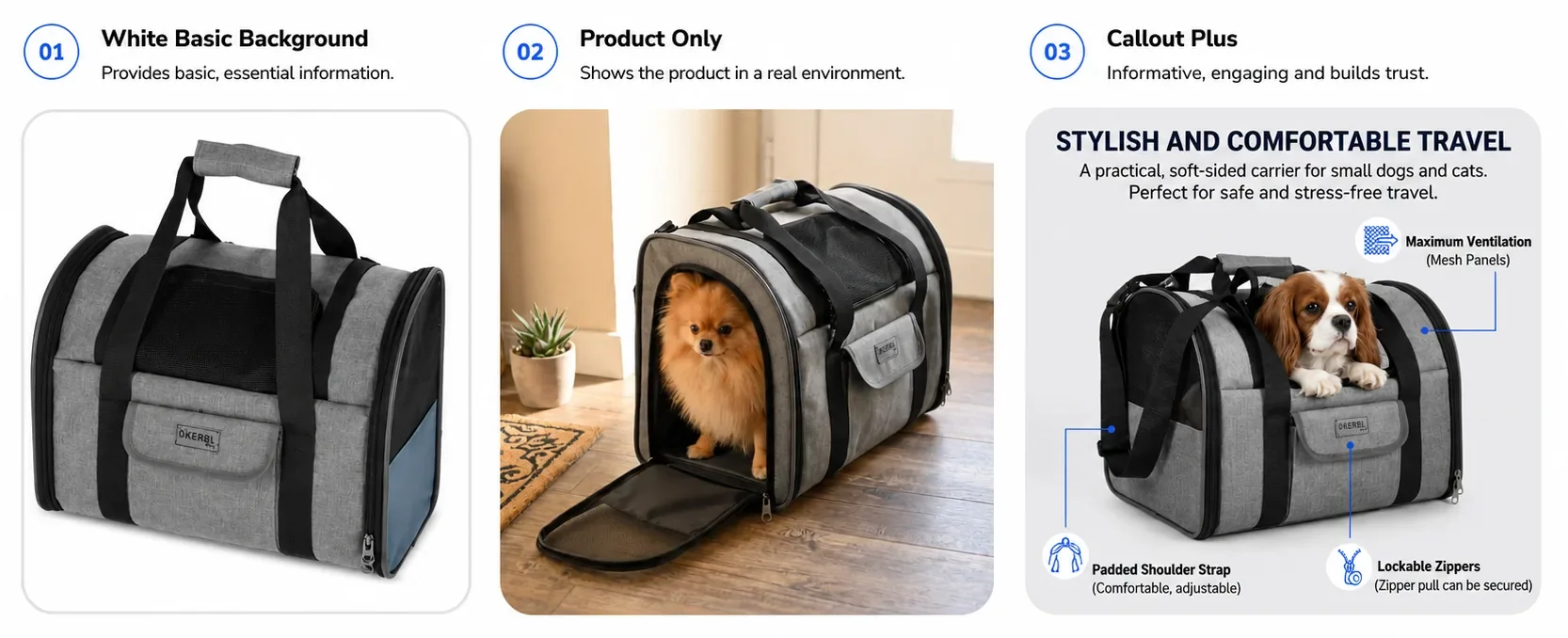
Over 11 days, at $5 a day per ad set, the Callout Plus style brought 42% more purchases than the white-background ads at a 29% lower cost per purchase, and Product Only reached a 34× ROAS. One store and one test, not a benchmark, but it shows what a new image per product can do.
OptiQube generates a new creative for every product in a catalog, in a scene, with callouts or with an offer, and you can see real output in the ad library or pick a style on our catalog ad styles page.
Frequently asked questions
What is creative automation?
Creative automation is software that produces ad creatives from data and rules instead of designing each one by hand. It can resize one design into many formats, fill a layout with product data, or generate new images. People still set the strategy, the style and the offer, and decide what goes live.
What is ad creative automation?
Ad creative automation is creative automation applied to ads: the images, videos and text of paid campaigns. For an ecommerce store it usually means turning a product feed into ad creatives for every product, keeping prices and stock current, and making new versions often enough that ads don't wear out.
How do I automate ad creative for a product catalog?
Start with a clean feed: good product photos, correct prices and stock. Choose a style and an offer, generate or apply the creative to every product, review the results, and send the approved set to Meta as a catalog campaign. Then test it against your current ads and refresh it on a schedule.
How do I automate dynamic product ads on Meta?
Connect your store or feed to a Meta catalog so products, prices and stock sync automatically, then run catalog ads from it. To automate the creative too, add Meta's frames or overlays, use a tool that applies a design to every product, or give each product a generated image in the catalog.
Is creative automation the same as AI-generated ads?
No. Much creative automation uses no generative AI at all: it fills fixed layouts with product data. Generative tools are one type of automation, the one that creates new images or text. Today the two often meet in one workflow, but they solve different problems.
What does Meta automate in catalog ads, and what doesn't it?
Meta can add frames and price overlays, adjust images for different placements, generate backgrounds and text variations, and pick the format and product for each person. It does not plan your creative strategy, write your offer or give every product a new scene in your brand's style that you approve first.
Will automated creatives look on-brand?
Only if you set the rules. Fixed layouts stay on-brand but look the same everywhere; generated images vary more and need review. Meta itself said in 2023 that there was still work to do on outputs customized to each brand's voice and visual style. Check fonts, colors, product accuracy and claims before anything goes live.
Do I still need a designer if I automate ad creative?
Usually yes, but for different work. Automation takes over the repetitive part, one product after another, while designers and marketers decide the look, the offer, the brand rules and which versions are good enough to run. Small stores without a designer can rely on preset styles and careful review.
Automate the repetition, keep the decisions
Ad creative automation isn't about removing people from the creative work. It removes the part nobody wants to do by hand, product after product, so the time goes into the decisions that matter: the style, the offer and what to test next.
Browse the ad library for real catalog ad creatives by industry, style and season, or start for free and generate creatives for your own feed.