Ad Creative for Meta: What It Is, How to Test It and How to Optimize It
 Nikolett Lorincz9 min read

You can spend a week on targeting, budgets and bid settings, and the person scrolling past your ad still decides in under a second whether to stop. What they react to is the creative.
On Meta that matters more than it used to. Broad audiences and Advantage+ leave fewer targeting levers to pull, and the creative itself now helps decide who sees the ad. Most guides still treat it as a design task, not something to test.
This guide covers what ad creative is on Meta, which parts of it matter, and the three ways Ads Manager lets you test it, with a real test from a store's account. First, a definition.
The short answer: ad creative is everything people see and read in an ad: the image or video, the text on it, the primary text, the headline and the call to action. On Meta it now does part of the targeting too, so test it on purpose, one change at a time, with Meta's A/B test or creative testing tool.
What ad creative means on Meta
Ad creative is the part of the ad people actually experience. Everything else, the audience, budget, placements and bid, decides where and how often that creative appears.
Ad copy is a subset of it: the written parts around the image or video. A new headline is a copy change; a new image, or new text inside the image, is a creative change. The difference matters when you test, because you want to know which one moved the result.
On Meta the line between creative and targeting has blurred. Meta's ad retrieval system, Andromeda, was built because, in Meta's words, "the number of ads creatives in Meta's recommendation systems is expected to grow significantly" (Meta Engineering, December 2024). With broad audiences, what the ad shows helps Meta decide who it is relevant to, which is why a genuinely different idea can reach people that a near-copy of the old ad doesn't.
The parts of a Meta ad creative
A single ad is made of two layers: what is in the image or video, and the text Meta places around it.

In the image:
- The product, shown so people recognize it at a glance;
- the scene around it: a room, a street, a person using it;
- text on the image, such as a headline, callouts for features the photo can't show, or an offer.
The example above has all three: the chair in a home office, a short headline, and three badges for the support, the fabric and the wheels.
Around the image:
- Primary text above the ad;
- headline and description below it;
- the call to action button, such as Shop now.
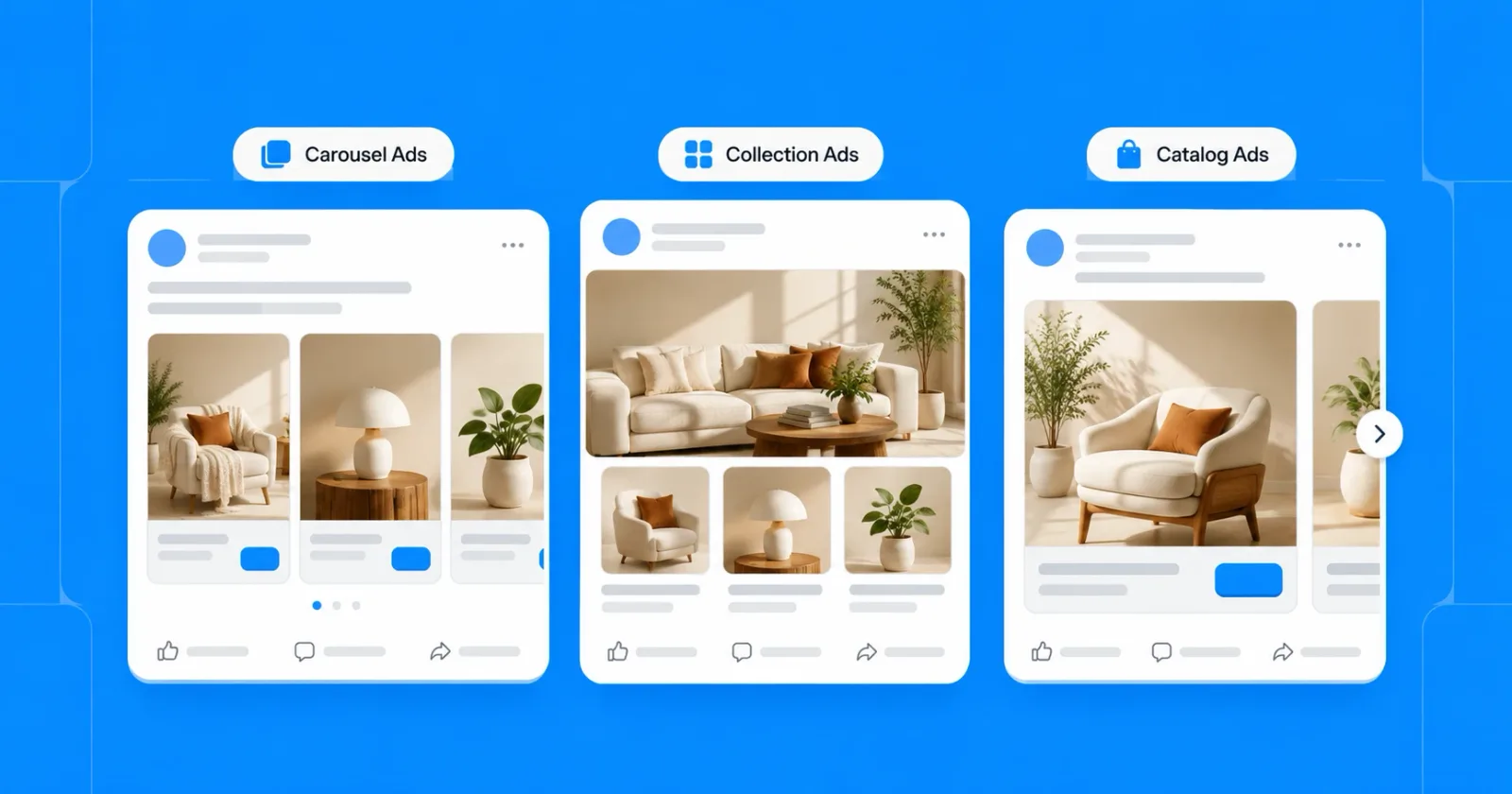
The format decides how many images you work with. A single image or video ad has one; a carousel has several cards; a catalog ad builds the image from your product feed for each person. Our guide to carousel, collection and catalog ads covers when each one fits.
In a catalog ad, the creative is a different image for every product, so the questions above apply to the whole feed at once.
What makes ad creative work on Meta
There is no single winning style, but the ads that hold attention in a feed tend to share six habits. Each one below has an example from the OptiQube ad library.
1. It is recognizable in a second
People scroll fast, and most decide before they read anything. The product and the point should be clear from the image alone: what it is, and why it is interesting right now.

Here the ball is caught mid-kick on a pitch, and the two-word headline only confirms what the image already says.
2. It says one thing
One benefit, one offer or one scene. An image that tries to carry a discount, three features and a brand story usually lands none of them. If you have more to say, save it for the primary text or for a second ad.

This ad has one message, the Black Friday discount, and gives it its own block next to the product, so it reads even at thumbnail size.
3. The product stays the hero
Headlines, badges and frames should sit around the product, not over it. Someone who can't see what they would be buying has no reason to tap.
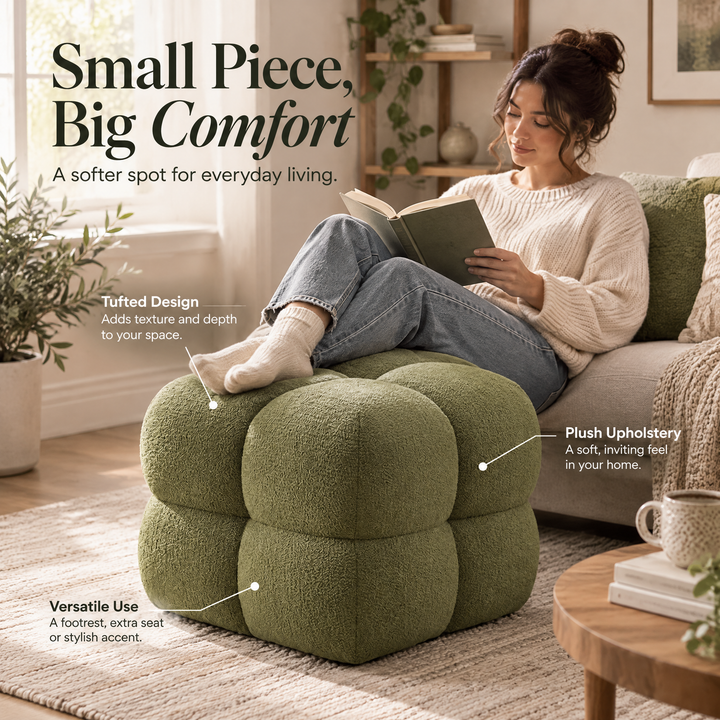
The ottoman fills the middle of the frame, and the callouts point at it from the edges instead of covering it.
4. It reads on a phone
Most people see your ad on a small screen, often for a second. Keep labels to two or three words, use large type, and leave enough contrast between the text and the background.

Three badges of two or three words each say what the product does, and each one is readable on a phone.
5. It fits the placement
The same ad appears in the feed, in Stories and in Reels, and each has its own shape. Square (1:1) works almost everywhere, portrait (4:5) fills more of the feed, and 9:16 fills the screen in Stories and Reels.
If you supply only one ratio, Meta crops or pads it for the rest, and the crop may cut off your headline. Keep text away from the edges, or supply a version per shape. Our image specs for catalog ads list the sizes.
6. It matches where the person is
Someone who has never heard of you needs a reason to care: a scene, a use, a benefit. Someone who already looked at the product, or left it in the cart, has the reason and may only need a nudge, such as an offer or a deadline.
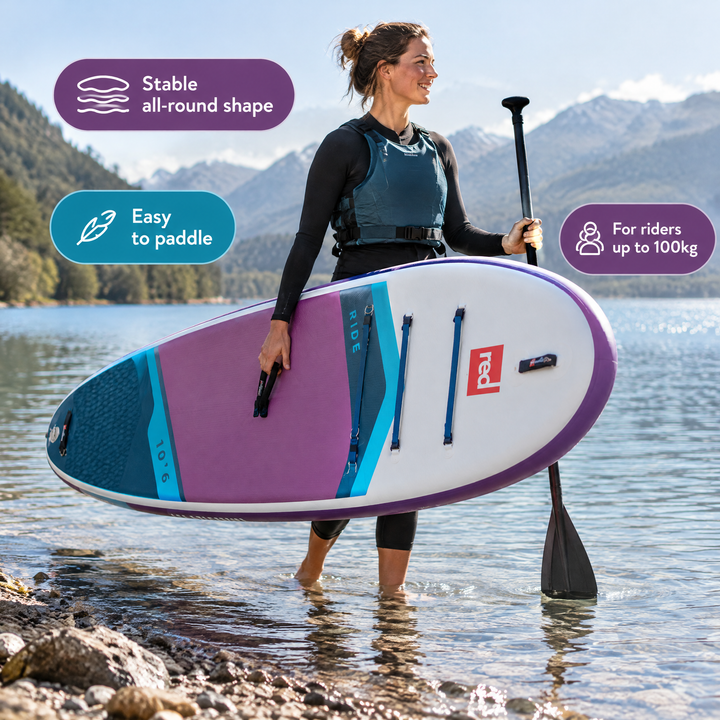

The paddle board ad sells the day out, which suits a new audience. The running shoe ad leads with Black Friday, which suits someone who already knows the shoe. Our retargeting guide shows how to give each stage its own creative.
The 12 catalog ad design rules go deeper into each habit for catalog ads.
Three ways to test creative on Meta
Ads Manager gives you three tools, and they answer different questions.
| A/B test | Creative testing | Advantage+ creative and multiple media | |
|---|---|---|---|
| What it answers | Which version performs better, with clean groups | Which of several new versions performs best inside a live campaign | Nothing directly; Meta picks and adjusts what to show |
| How people are split | Each person sees only one version | Versions share the campaign's audience | Meta decides per impression |
| How many versions | Two or more | 2 to 7 test ads in the account we checked | Up to 10 media in one ad |
| Budget | Each version gets its own share | A daily amount you set from the campaign budget | The ad's normal budget |
| Where you find it | Campaigns table → A/B test, or Experiments | Ad level → Creative testing → Set up test | Ad level → Advantage+ creative; media in a Single image or video ad |
| Use it when | You want a reliable answer before you change a strategy | You want to try new ideas without building a new campaign | You want better delivery from assets you already trust |
A/B test
Meta describes it plainly: "We'll make sure nobody sees more than one version for better accuracy." You start from a campaign, ad set or ad, make a copy or pick a second existing ad, and choose what differs between the versions.
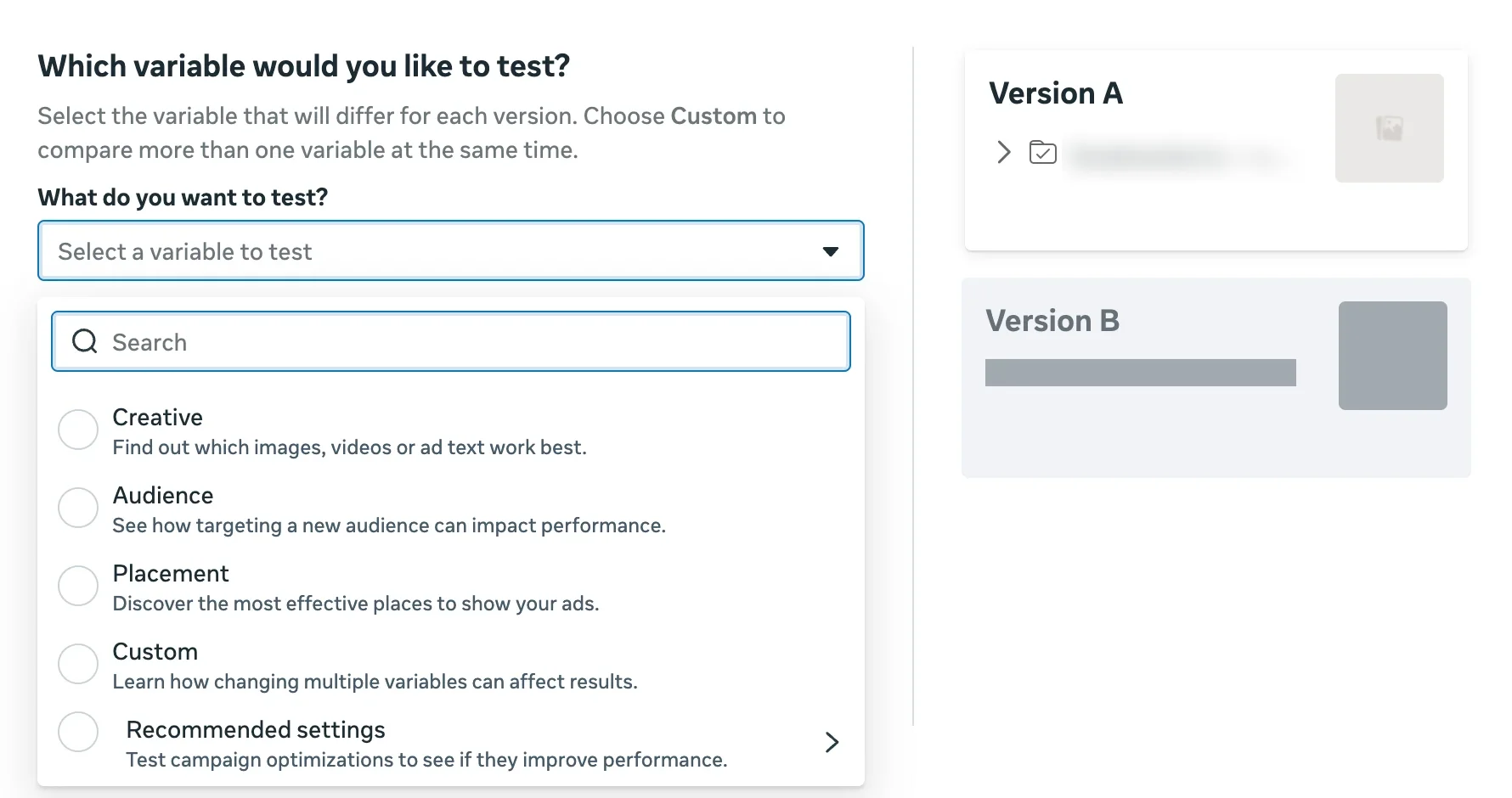
For a creative test, pick Creative ("Find out which images, videos or ad text work best"). Custom lets you change more than one variable at once, which is closer to a multivariate test.
Creative testing
Creative testing sits at the ad level, below the Advantage+ creative settings. In the account we checked in November 2026, Meta described it as a way to "compare up to 7 different versions of your creative in a test that helps ensure delivery to new test ads."
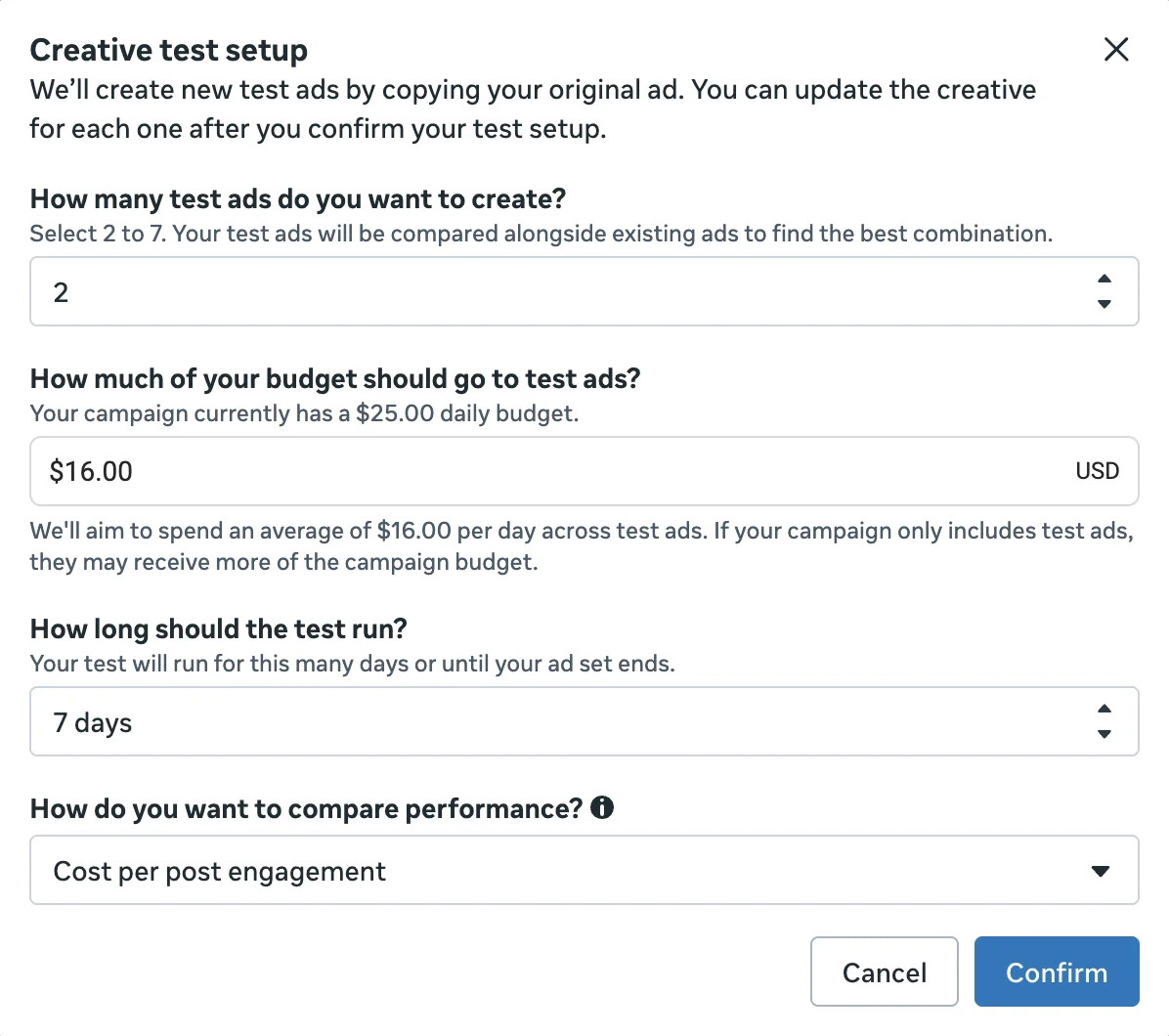
Meta copies your original ad into the test ads, and you change the creative in each copy. You choose how many test ads to create, how much of the daily budget goes to them, how long the test runs (seven days by default) and which metric decides the winner. The limit may differ in your account; some advertisers have reported different caps as Meta rolled the tool out.
Advantage+ creative and multiple media
Advantage+ creative can adjust your image, add overlays or change text to improve delivery. Meta has also retired the old dynamic creative switch: in the ad set it now says "Dynamic creative is no longer available," and points you to adding up to 10 media in a single image or video ad instead.
Both are useful for delivery, but neither is a test: Meta mixes the versions, so you learn what Meta chose to show, not which idea is better. When you test a design, check the Advantage+ creative settings and turn off anything that would change it.
A/B testing vs multivariate testing
An A/B test changes one thing and keeps everything else the same, so the result has one explanation. A multivariate test changes several things at once, such as the image, the headline and the offer, and compares every combination.
The catch is volume. Three images, three headlines and two offers already make 18 combinations, and each one needs enough results to compare. For most stores that means a budget and a traffic level they don't have. A series of simple A/B tests, each building on the last winner, usually gets you to a clear answer sooner.
Meta's Custom option in the A/B test, and multiple media in one ad, sit in between: they let you vary more than one thing, but the more you vary, the harder it gets to say why one version won.
How to run a creative test, step by step
- Write down what you expect. "A lifestyle scene will get more purchases than the white-background photo" is a test. "Let's try some new images" is not.
- Change one thing. The image, or the text on it, or the offer. Keep the audience, budget, placements and product set the same.
- Pick the metric before you start. For a store this is usually cost per purchase; click-through rate tells you whether the image stops people, not whether they buy.
- Give it time. Each version needs enough results to compare, which for most stores means one to two weeks. Judging after a day mostly measures Meta's learning phase.
- Keep the winner and test the next idea against it. Each test should start from the last winner, not from scratch.
What a creative test looked like in a real account
In the Delifarm case study, the agency Clickbrains tested three catalog ad concepts for the same products: the store's white-background photos, a Product Only style in a real setting, and a Callout Plus style with feature labels.
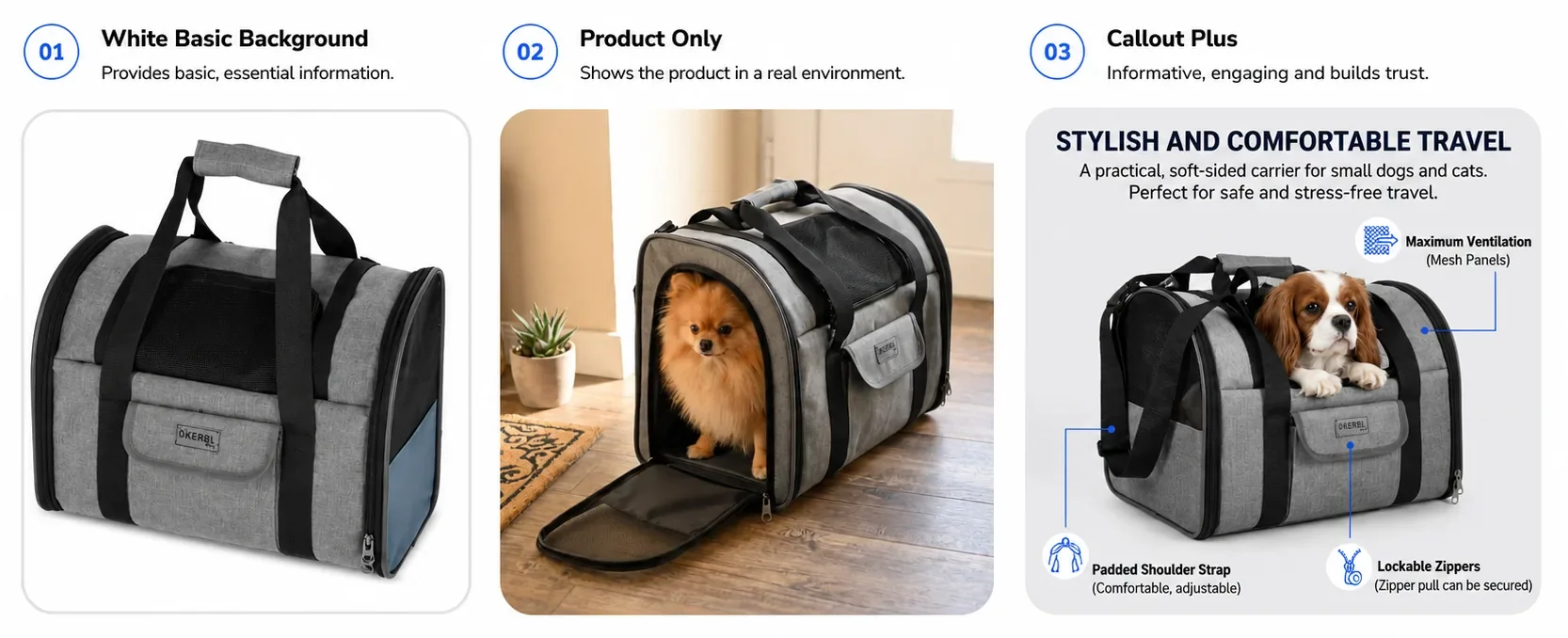
Over 11 days, at $5 a day per ad set, Callout Plus brought 44 purchases against 31 for the white-background ads, 42% more, at a cost per purchase of $1.22 against $1.73, or 29% lower. Product Only reached the highest return, a 34× ROAS.
That is one store, one test and a small budget, not a benchmark. It shows two things a single test can't hide: a different image can change the result a lot, and different concepts can win on different goals.
Keeping creative fresh
Even a winning ad wears out. When frequency keeps rising while cost per result climbs and click-through rate falls, the same people have seen it too often. Small retargeting audiences tire faster than broad ones; our retargeting guide shows what to watch.
You don't always need a new idea. A new scene for the same product, such as the same yoga mat on a city walk and then rolled out at home, often brings an ad back to life.


The ad library has seasonal collections, from Black Friday to winter, if you want to see how the same product changes with the season.
Where AI fits
Testing needs versions, and making versions is where most teams get stuck: one more photoshoot or one more round of design for every product rarely fits the budget. Generative tools change that. OptiQube, our product, generates a new image for every product in a catalog, in a scene, with callouts or with an offer, and the creatives you approve go to Meta as a paused campaign draft.
AI doesn't decide what to test or what your offer is. It makes it cheaper to have the versions a test needs.
Frequently asked questions
What is ad creative?
Ad creative is everything people see and read in an ad: the image or video, any text on it, the primary text, the headline and the call to action. It is separate from the settings behind the ad, such as the audience, budget and placements, although on Meta the creative now also helps decide who sees the ad.
What is the difference between ad creative and ad copy?
Ad copy is only the written part: the primary text, the headline and the description. Ad creative is the whole ad, including the image or video and any text placed on it. A test that changes the image is a creative test; one that changes only the headline is a copy test.
How do I test ad creative on Meta?
Use one of Meta's tools and change one thing at a time. An A/B test splits people into groups so that each sees only one version. Creative testing runs inside your campaign and gives two to seven new versions a share of the budget. Advantage+ creative and multiple media in one ad let Meta optimize, but they are not a clean test.
What is the difference between A/B testing and multivariate testing for ads?
An A/B test changes one thing, such as the image, and compares two or more versions. A multivariate test changes several things at once and compares the combinations. Multivariate tests need far more budget and traffic to give a clear answer, so most stores are better off running a series of simple A/B tests.
How many creatives should I test at once on Meta?
Two to four versions of one idea is a good start for most budgets, because each version needs enough results to compare. Meta's creative testing tool allowed up to seven test ads in the account we checked in November 2026; more versions spread the same budget thinner.
How long should a creative test run?
Long enough for each version to get enough results to compare, which for most stores means one to two weeks. Meta's creative testing tool defaults to seven days. Stopping after a day or two usually means judging Meta's learning phase rather than the creative.
How often should I refresh my Meta ad creative?
When the numbers tell you to, not on a fixed calendar: if frequency keeps rising while cost per result climbs and click-through rate drops, people have seen the ad too often. Small retargeting audiences tire faster than broad prospecting ones. A new scene for the same product is often enough.
Does Advantage+ creative replace creative testing?
No. Advantage+ creative adjusts and combines your assets to improve delivery, but it doesn't tell you which idea works better. Use it alongside testing, and turn off the enhancements that would change a design you are testing, so the result reflects your creative and not Meta's edits.
Test the creative, not just the settings
On Meta, the creative is the part of the ad you still fully control, and more and more it decides who sees the ad at all. Define it, change one thing at a time, and let Meta's own tools tell you which version wins.
Browse the ad library for creatives by industry and style, or start for free and generate catalog ad creatives for your own feed.