Creative Fatigue on Meta: How to Spot It and How to Fix It
 Nikolett Lorincz9 min read

Every ad that works on Meta starts to work a little less the longer it runs. Results drift, cost per purchase creeps up, and the ad that carried the account last month suddenly needs twice the budget for the same orders.
Most of the time the targeting isn't broken and the algorithm isn't punishing you. The same people have seen the same picture too often. Meta even has a name for it in Ads Manager, but the status only appears in some ad sets, and catalog ads, the format many stores run all year, are not among them.
This guide explains what creative fatigue is in Meta's own words and numbers, how to spot it with and without Meta's label, and what to change when it hits, including in a product catalog.
The short answer: creative fatigue, often called ad fatigue, is when the same people have seen the same image or video so often that they stop responding, and cost per result rises. Meta flags it in Ads Manager as "Creative limited" or "Creative fatigue." The fix is a materially different new creative, not a new border or headline.
What creative fatigue (ad fatigue) is
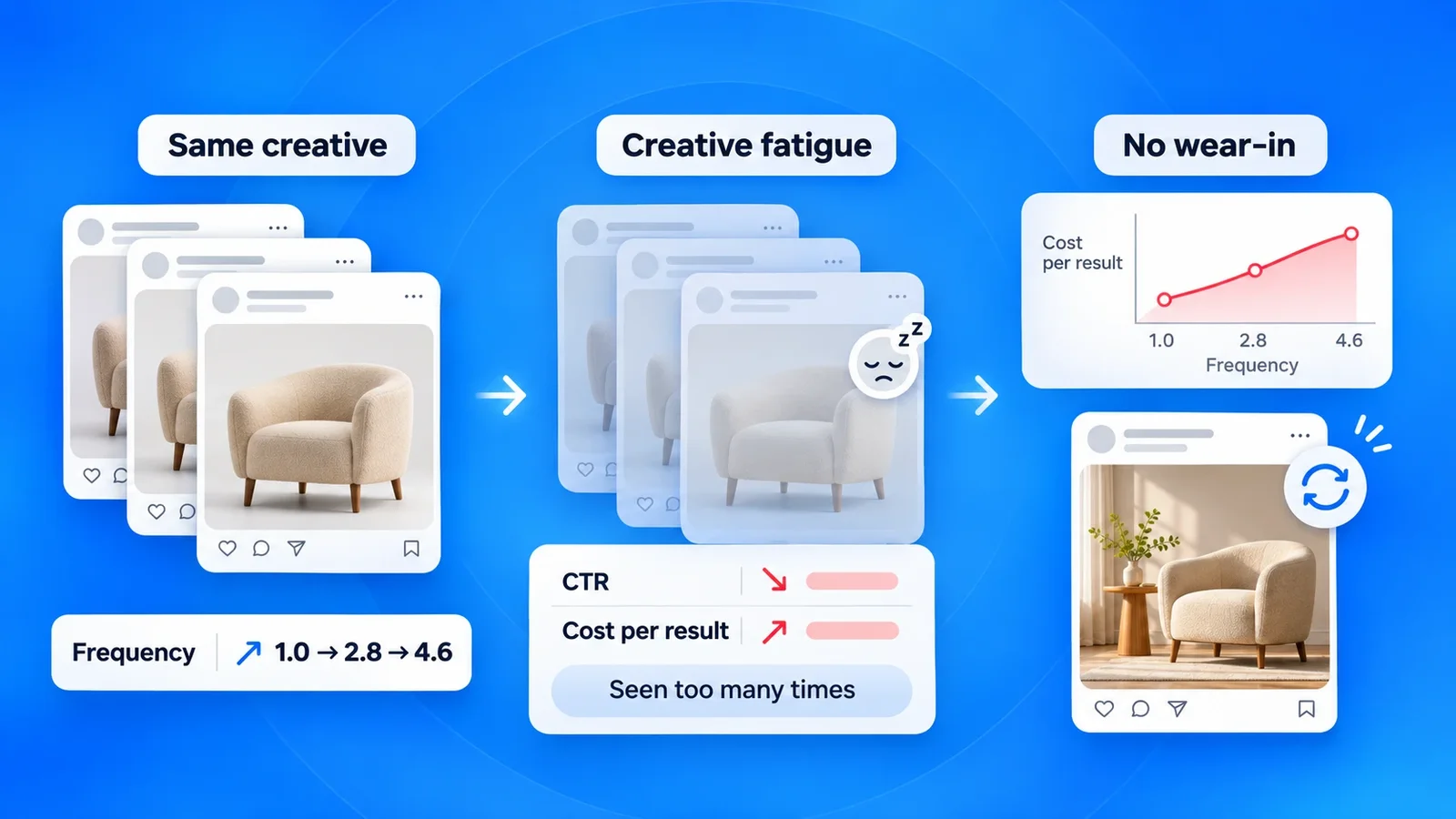
Meta's Business Help Center defines it plainly: creative fatigue "occurs when an audience has seen the same creative too many times". People become less likely to engage, and the ad's cost per result goes up.
Ad fatigue is the same thing under a different name. Meta prefers the word creative because the wear-out is tied to the image or video, not to the ad. Its analytics team puts it this way: if several ads use the same creative elements, a person experiences them as the same ad. Two campaigns with one hero photo don't give you twice the freshness; they wear the photo out twice as fast.
The same research found no "wear-in" period for sales and lead objectives. A common belief is that an ad needs a few views before it starts to work; for direct response ads, Meta's data showed clicks and conversions getting more expensive with every repeat, from the start.
How common it is: Meta's own numbers
In 2023, the Analytics at Meta team published a study of repeated exposures across Meta ad impressions. Four findings matter for advertisers:
- Repeats are normal. On average, a person had already seen the same creative 4.2 times before the current impression, over a 30-day window, and more than 19% of impressions came after five or more earlier views.
- The drop is steep. By the team's model, at four repeated exposures the likelihood of a conversion is about 45% lower.
- New creative helps. In a test across roughly 26,000 cases, adding a new creative to fatigued ad sets improved conversion rate by 8% on average in the high-fatigue cases, and the more fatigued the ad set, the bigger the gain.
- Frequency misleads. Frequency is reported for an ad, ad set or campaign, but fatigue happens at the level of the creative, and an average hides the people who have seen the ad far more often than the rest.
Two caveats. The figures are from 2023, and the team excluded dynamic product ads from the main analysis because creatives are defined differently there. Treat the numbers as the shape of the problem, not as a forecast for a catalog campaign.
How Meta flags it in Ads Manager
Meta checks for fatigue at two points. Before a campaign goes live, Ads Manager shows a warning if it predicts creative fatigue in the first seven days. After it goes live, the Delivery column can show one of two statuses for an ad set or ad:
| Status | What it means |
|---|---|
| Creative limited | Cost per result is higher than the ads you ran in the past, but less than twice as much |
| Creative fatigue | Cost per result is at least twice as much as the ads you ran in the past |
To decide, Meta counts all recent exposures of the ad's image or video, including those from other campaigns on your Page, and compares the ad's cost per result with your own history. When an ad set is eligible, the recommendations also appear in your opportunity score.
There is a catch. The Help Center says the feature is "only available for ad sets with one creative", except those with Advantage+ catalog ads, dynamic creative or Advantage+ app campaigns, and that it isn't available with the sales objective before an ad set is active. If you run several creatives in one ad set, or a catalog campaign, you won't see the label at all. You need to read the signals yourself.
The signals to read yourself
No single metric proves fatigue. The pattern does: several numbers moving the wrong way on the same creative while nothing else in the campaign changed.
| Signal | Where to find it in Ads Manager | What it suggests |
|---|---|---|
| Frequency rising | Columns → Customize columns → Frequency | The same people are seeing the ad more often |
| Reach flattening | Reach column, by week | Meta has run out of new people to show it to |
| Link click-through rate falling | Columns → Customize columns → CTR (link click-through rate) | People still see the ad but stop acting on it |
| CPM holding steady | CPM column | If CPM holds while CTR falls, the creative is the problem, not auction prices |
| Cost per result climbing | Cost per result column | The outcome you pay for is getting more expensive |
Look at the trend, not at one day. Use Breakdown → By time → Week on the ad and compare at least four weeks, so a slow weekend or a promotion doesn't look like fatigue.
There is no universal threshold. Blog posts quote frequency limits and fixed day counts, but none of them come with a source, and Meta itself says frequency is a weak measure of fatigue. The benchmark is your own account: how this creative performed in its first weeks, and how your past creatives aged.
Fatigue or saturation?
Not every decline is creative fatigue. Meta's researchers separate it from audience saturation: fatigue is the part of the drop that comes back when the same people get a new creative of equal or better quality.
That gives you a simple test. Add a materially different creative to the same ad set and audience. If results recover, the old creative was tired. If they don't, the audience has seen enough of you, and the fix is a larger or different audience, not another image.
Why catalog ads need a different check
Catalog ads often run all year with the same product photos, and they wear out in their own way.
The label won't come. Advantage+ catalog ads are excluded from Meta's creative fatigue feature, so the Delivery column won't warn you.
The feed photo is the creative. Every product appears with the image from your feed, usually the same packshot on a white background. A person who browsed a product sees that photo in retargeting, in prospecting and on the product page itself. Fatigue builds per product, and fastest for your best-sellers.
Retargeting tires first. Retargeting audiences are small, so the same people see the same products quickly. Our retargeting guide covers what to watch in those ad sets.

A frame isn't a new creative. Meta's frames and overlays add a border, a logo or the price around each product photo. They are useful for branding, but the photo underneath stays the same, and Meta asks for an image or video that is "materially different" from the original. A new border on the same packshot is unlikely to count.
How to fix creative fatigue
Work through the fixes in this order. The first, third and fourth are Meta's Help Center recommendations; the second comes from Meta's research.
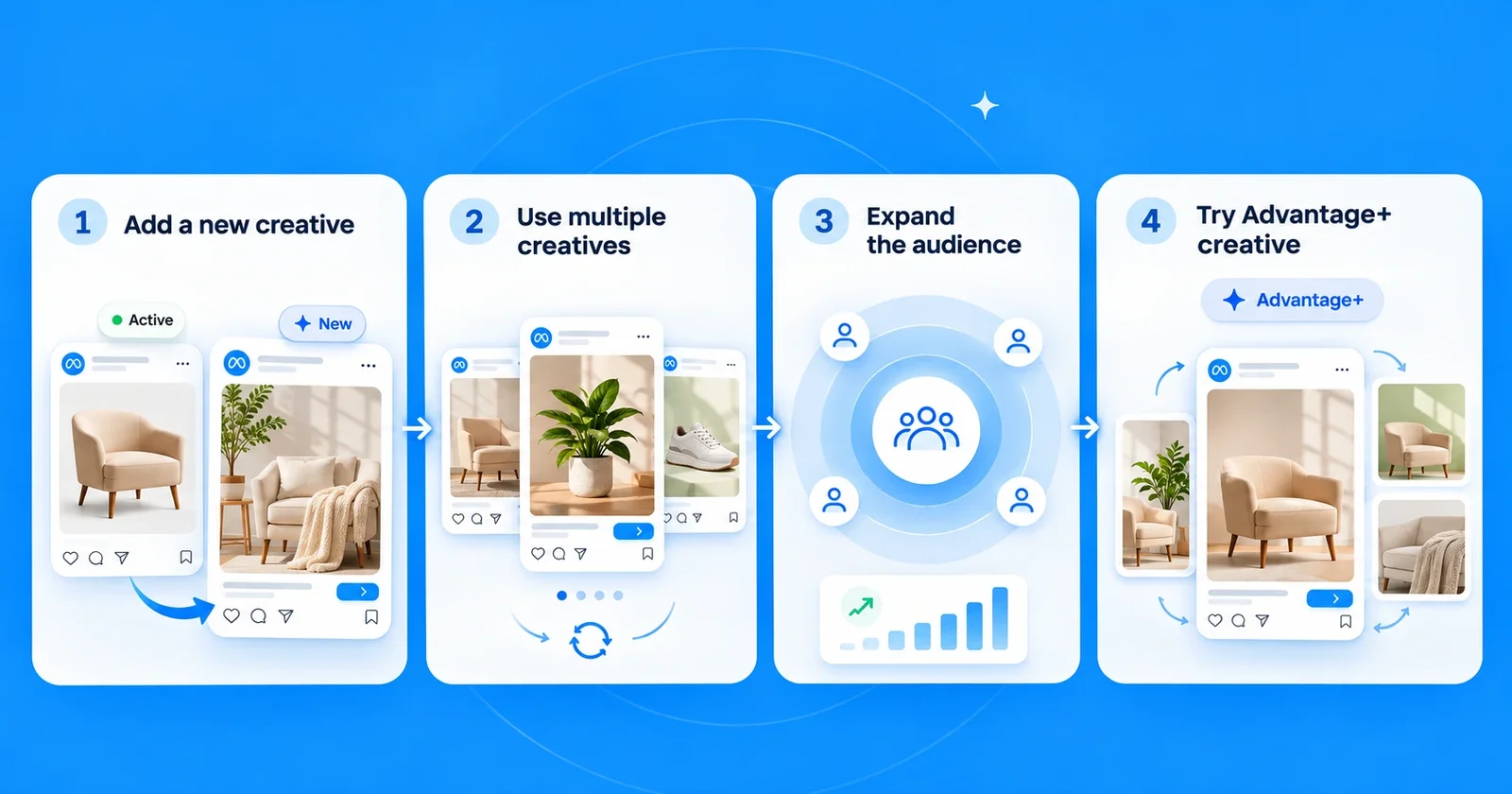
- Add a new ad with a materially different image or video. A new scene, a new angle, a person using the product, a different layout. Meta notes that keeping your original ad active instead of pausing it "may maximize results", so let delivery shift to the new creative rather than switching the old one off.
- Give the ad set more than one creative. Meta's research concludes that repetition is best spread "across a large number of different looking ads." Several distinct creatives in one ad set let the system rotate them instead of repeating one.
- Expand the audience. Reach new people who haven't seen the ad yet. This also tells you whether you were dealing with saturation.
- Try Advantage+ creative. Meta can create variations of a single image or video and show each person the version they're most likely to respond to. What it changes in catalog ads is covered in our Advantage+ catalog ads guide.
What doesn't work: changing only the headline or primary text, putting a new frame on the same photo, or raising the budget. More spend on a tired creative buys more of the same repeats.
New creatives are only half the job; you still need to know which one wins. Our guide to Meta ad creative explains how to test a new version before it replaces the old one.
Fixing it in a catalog: new creative per product
In a catalog, "a new image" means a new image for every product you advertise, which is why most stores keep running the feed photo long after it has worn out. The way around it is to give each product a few distinct creatives and refresh them on a schedule.
Here is one sofa in three creatives that a viewer would not mistake for each other: a lifestyle scene, a version with feature callouts, and a clean product-only shot.



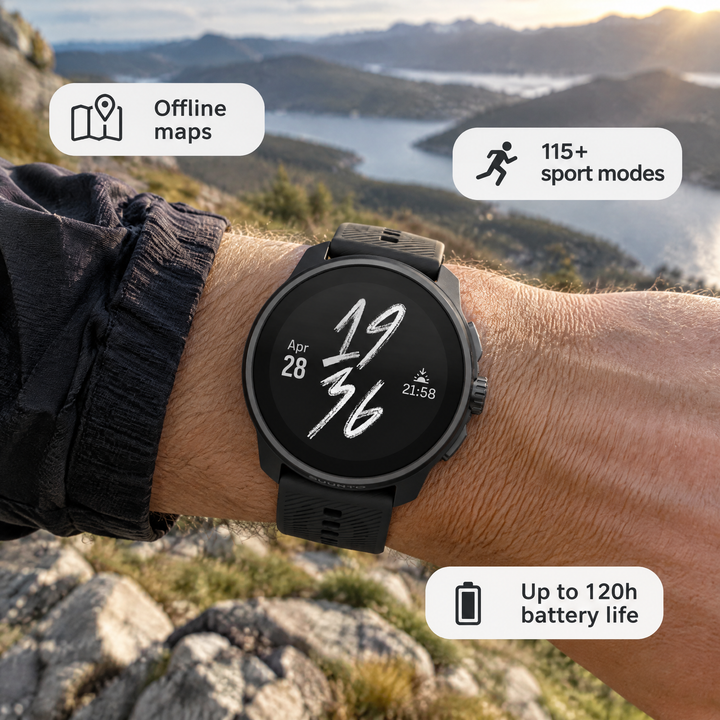
Seasons give you a natural refresh point. The same sports watch can run with outdoor feature badges in autumn and in a gift scene for the holidays:

How much a new image can change is visible in the Delifarm case study. The agency Clickbrains replaced the store's white-background photos in its catalog ads with two designed styles and ran them side by side.
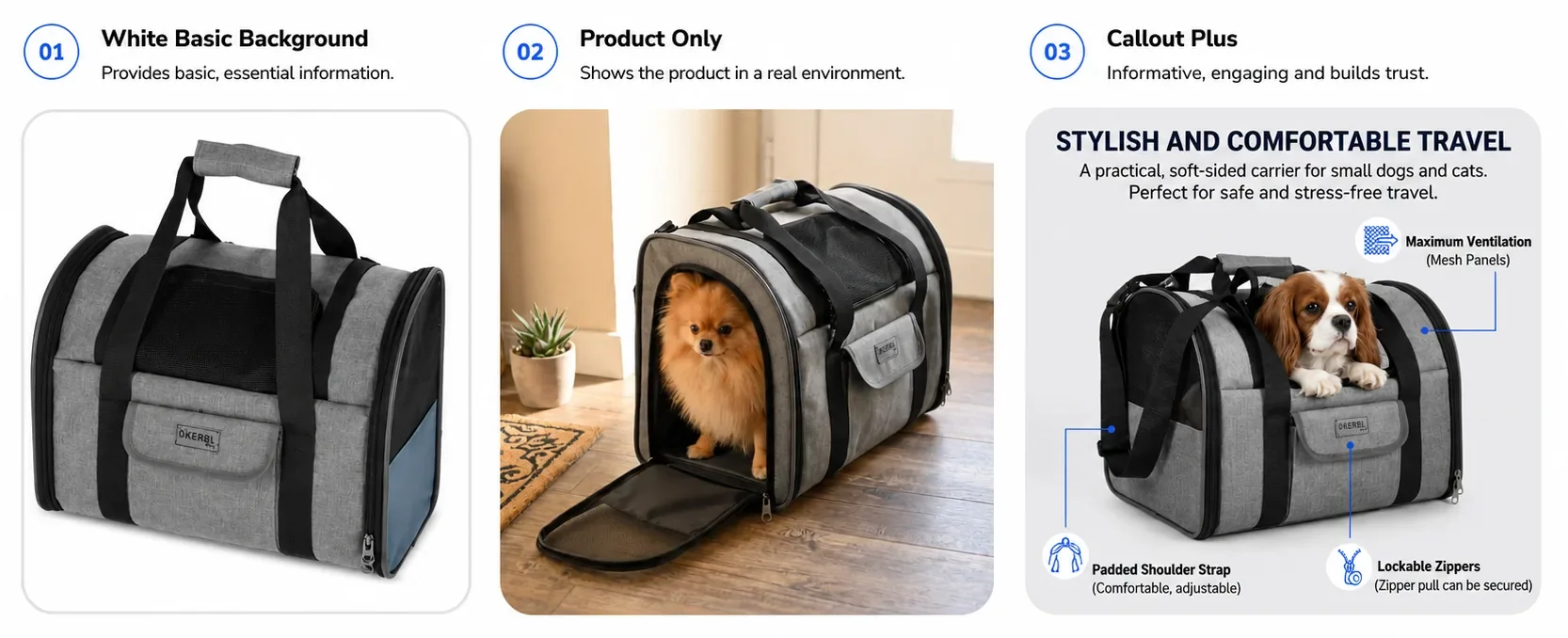
Over 11 days, at $5 a day per ad set, the Callout Plus style brought 42% more purchases than the white-background ads at a 29% lower cost per purchase, and Product Only reached a 34× ROAS. It was a creative test, not a fatigue test, and one store is not a benchmark, but it shows how far the feed photo is from the best a catalog ad can do.
Making these versions by hand rarely fits the budget once a catalog has more than a few dozen products. OptiQube, our product, generates a new creative for every product in a catalog, in a scene, with callouts or with a seasonal offer, and the creatives you approve go to Meta as a paused campaign draft. You can browse real examples in the OptiQube ad library, grouped by style and by season, such as lifestyle and Christmas. How stores make new creative at that scale is covered in our guide to ad creative automation.
How often to refresh your Meta ad creative
There is no fixed number of days. A small retargeting audience can tire within weeks; a broad prospecting campaign with several creatives can run for months. Refresh when the signals say so, and keep the next creative ready before you need it.
A weekly five-minute check is enough for most accounts:
- Scan the Delivery column for Creative limited or Creative fatigue.
- For your top-spending ads, compare frequency, link CTR and cost per result with the previous week.
- Check whether reach is still growing or has flattened.
- Open your catalog ad sets separately, since they won't carry Meta's label.
- Note which creatives are oldest, and line up a replacement for each.
Frequently asked questions
What is creative fatigue?
Creative fatigue is what happens when the same people see the same image or video so often that they stop responding to it. In Meta's words, it occurs when an audience has seen the same creative too many times, which can make people less likely to engage and lead to a higher cost per result.
Is ad fatigue the same as creative fatigue?
Yes, the two terms describe the same thing. Meta uses creative fatigue because the wear-out is tied to the image or video, not to the ad: if two ads use the same picture, people experience them as one, and both wear out together.
How do I know if my Meta ads have creative fatigue?
Check the Delivery column in Ads Manager for a Creative limited or Creative fatigue status. Then read the trend yourself: frequency rising, click-through rate falling and cost per result climbing on the same creative, week after week, while nothing else in the campaign changed.
What does Creative limited mean in Meta Ads Manager?
It means Meta believes your audience has seen the ad's image or video too many times, and the ad's cost per result is higher than your past ads but less than twice as much. At twice as much or more, the status changes to Creative fatigue.
What frequency is too high on Facebook ads?
There is no single number. Meta's own analysis says frequency is a weak signal for fatigue, because it is an average for an ad or ad set while fatigue happens at the level of the creative. Compare frequency with click-through rate and cost per result over several weeks instead of watching one threshold.
Does creative fatigue affect catalog ads?
Yes, but Meta's fatigue status doesn't help there: the Help Center says the feature excludes ad sets with Advantage+ catalog ads. Catalog ads also tend to show the same feed photo for each product everywhere, so you have to read the signals yourself and refresh the image product by product.
Should I pause a fatigued ad or keep it running?
Meta recommends adding a new ad with a materially different image or video and notes that keeping the original active, instead of pausing it, may maximize results. Let the delivery system move spend to the new creative rather than switching the old one off on day one.
What is the difference between creative fatigue and audience saturation?
Creative fatigue goes away when the same people get a new creative of equal or better quality. Audience saturation doesn't: if a fresh image brings no recovery, the people in the audience have simply seen enough of your brand, and the fix is a larger or different audience.
Keep your best products looking new
Creative fatigue isn't a sign that an ad was bad. It is the price of an ad that worked long enough for people to remember it. Treat creative as something you refresh on purpose, product by product, and the next drop in results becomes a scheduled task instead of a surprise.
Browse the ad library for fresh creatives by industry, style and season, or start for free and generate new catalog ad creatives for your own feed.