Static Ads vs Dynamic Ads: When Each Works, With Examples
 Nikolett Lorincz7 min read

Every Meta ad starts with a choice most people make without noticing: design one ad that everyone sees, or let your product catalog fill the ad for each person. That is the difference between a static ad and a dynamic one.
The trouble is that "dynamic" means three different things depending on who you ask, and most comparisons mix display banners, Meta's catalog ads and Meta's old dynamic creative switch into one answer. The advice ends up as "it depends", without saying on what.
This guide sorts out what static and dynamic mean on Meta, shows when each one works, and gives real static ad examples for ecommerce. It ends with the option most comparisons skip: a dynamic ad that looks as designed as a static one.
The short answer: a static ad shows everyone the same image and text; a dynamic ad on Meta pulls products from your catalog and shows each person the ones they're most likely to buy. Use static ads for one product, one offer or one story, and dynamic ads when you have many products or want to retarget.
What a static ad is
A static ad is one fixed creative that every viewer sees the same way: the same image, the same headline, the same offer. You design it, upload it and it runs until you replace it.
Static describes the content, not the motion. A video that is the same for everyone is still static in this sense; what makes an ad dynamic is that its content changes from one viewer to the next.

This ad says one thing to everyone who sees it: the head torch is built for dark trails. That focus is the strength of a static ad, and its limit is that it covers one product.
What "dynamic" means on Meta (three different things)
Most confusion in this topic comes from one word doing three jobs.
| Dynamic ads (catalog ads) | Dynamic creative | Display DCO | |
|---|---|---|---|
| Where the content comes from | Your product catalog | The images and text you upload | An ad server's templates and data |
| What changes per person | Which products appear, with their image, name and price | Which of your images and text combinations appear | Layout, product and message, by rules or data |
| Where you set it up | Ad level → Creative source → Product media | Retired as a switch; now multiple media in one single image or video ad | Outside Meta, in display platforms |
| What it is for | Many products, retargeting, changing prices | Letting Meta pick the best mix of your assets | Banner campaigns across websites |
Dynamic ads are what Meta now calls Advantage+ catalog ads. In Ads Manager, the switch sits in the ad setup: Manual upload gives you a static single image, video or carousel, and Product media ("Show relevant images and videos from your catalog") turns the ad into a catalog ad. Our guide to Meta catalog ads covers them in full.
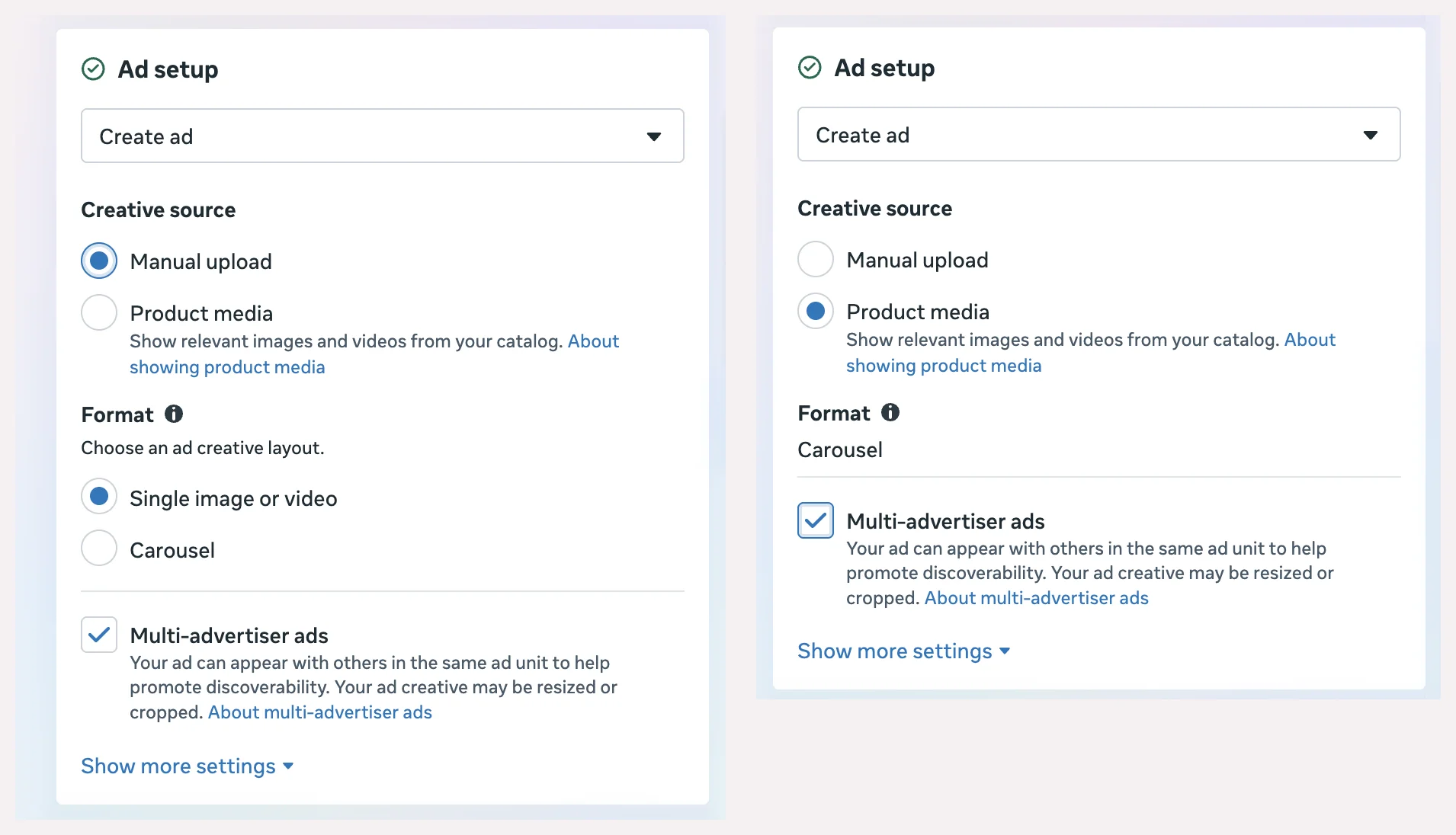
Dynamic creative was a separate ad set switch that mixed the images and text you uploaded. In the account we checked in November 2026, Ads Manager says "Dynamic creative is no longer available" and points to adding up to 10 media in a single image or video ad instead. The result is still built from your own assets, not from a catalog. Our Advantage+ guide explains what Meta's automatic changes do to them.
Display DCO (dynamic creative optimization) is the banner world's version: ad servers assemble display ads from templates and data. It shares the name, not the mechanics, and this guide sets it aside.
Static vs dynamic ads at a glance
| Static ads | Dynamic (catalog) ads | |
|---|---|---|
| Content | One fixed creative | Built from the catalog for each person |
| Personalization | None; everyone sees the same ad | Meta picks products per person, often ones they viewed |
| Production | A design for each ad | A feed and, ideally, a good image per product |
| Scale | One ad, one message | One ad, thousands of products |
| Keeping current | Replace the ad when the price or stock changes | Updates from the catalog |
| Typical use | Launches, hero products, offers, brand messages, concept tests | Large catalogs, retargeting, always-on sales |
When static ads work better
Static ads win when the message is bigger than any one product's photo, or when there is only one product to talk about.
- A launch or a hero product. A new product needs a story, and a designed ad tells it better than a feed photo.
- One offer or one season. A Black Friday banner or a Christmas scene works best when every element is chosen for that message.
- A brand message. Who you are, why you exist, what makes you different: none of that lives in a product feed.
- A small catalog. With a handful of products, designing each ad is realistic, and you keep full control.
- Testing a new idea. Because you control exactly what people see, a static ad is the cleanest way to find out whether a concept works before you roll it out. Our guide to Meta ad creative shows how to run that test.
When dynamic ads work better
Dynamic ads win when there are more products than anyone could design ads for.
- A large catalog. One ad covers every product, and Meta chooses which ones to show each person.
- Retargeting. Showing people the exact product they viewed is what catalog ads were built for; our retargeting guide covers the setup.
- Changing prices or stock. The ad reads them from the feed, so a sale price or a sold-out product doesn't need a new design.
- Always-on sales. A catalog campaign keeps running across the year while individual products come and go.
The usual weakness of dynamic ads is the image: by default, each card is the product photo from your feed, often on a white background. That is where the next section comes in.
Static ad examples for ecommerce
These examples from the OptiQube ad library are designed images, each made for one product. They show the main types of static ad, and each one can also be used inside a catalog ad.
Lifestyle: the product in the place it is used. A tent by a mountain lake sells the weekend, not the fabric.

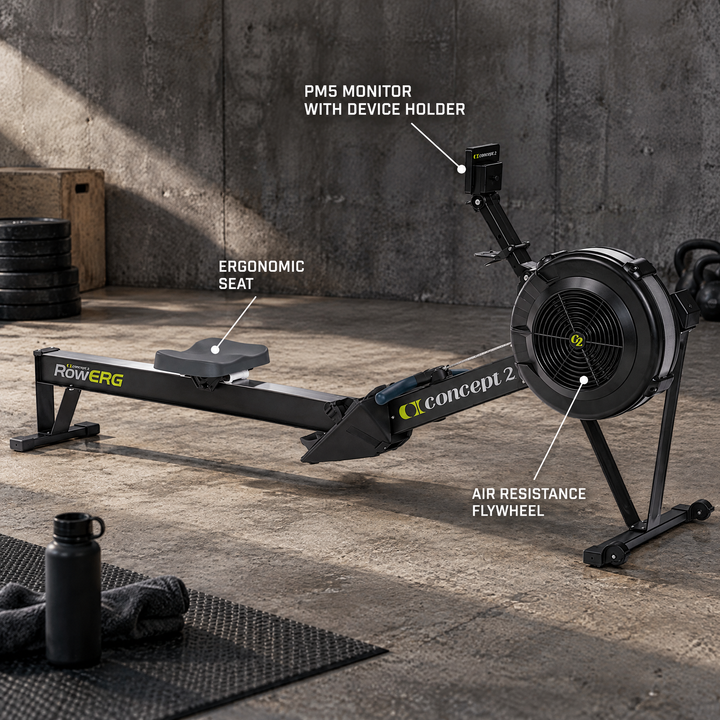
Callout: labels pointing at what the photo can't show. Here the monitor, the seat and the flywheel of a rowing machine.
Badge: two or three short benefits next to the product, readable at a glance.

Offer: the sale as the main message, with the product next to it.

Collage: the product worn or used, with close-ups of the details beside it.

Headline: a short, bold line carries the ad, with the product as proof.

Seasonal: the same product, dressed for the season. A cat tree next to the Christmas tree reads as a December gift.

The ad library has more examples, by style, industry and season.
You don't have to choose: static-looking creative in a dynamic ad
The best of both is a catalog ad where every product has a designed image. Meta still picks the product for each person, but the person sees a lifestyle scene, a callout or a badge instead of a white-background packshot.
There are three ways to get there:
- Meta's frames and overlays add one border, logo or price label on top of every product photo.
- Meta's image templates in Commerce Manager build one layered layout that fills in for every product.
- A designed image per product in the catalog, made by a designer or generated. Our 12 catalog ad design rules compare the three.
In the Delifarm case study, the agency Clickbrains tested exactly this: the same catalog ads with the store's white-background photos, with a Product Only style in a real setting, and with a Callout Plus style with feature labels.
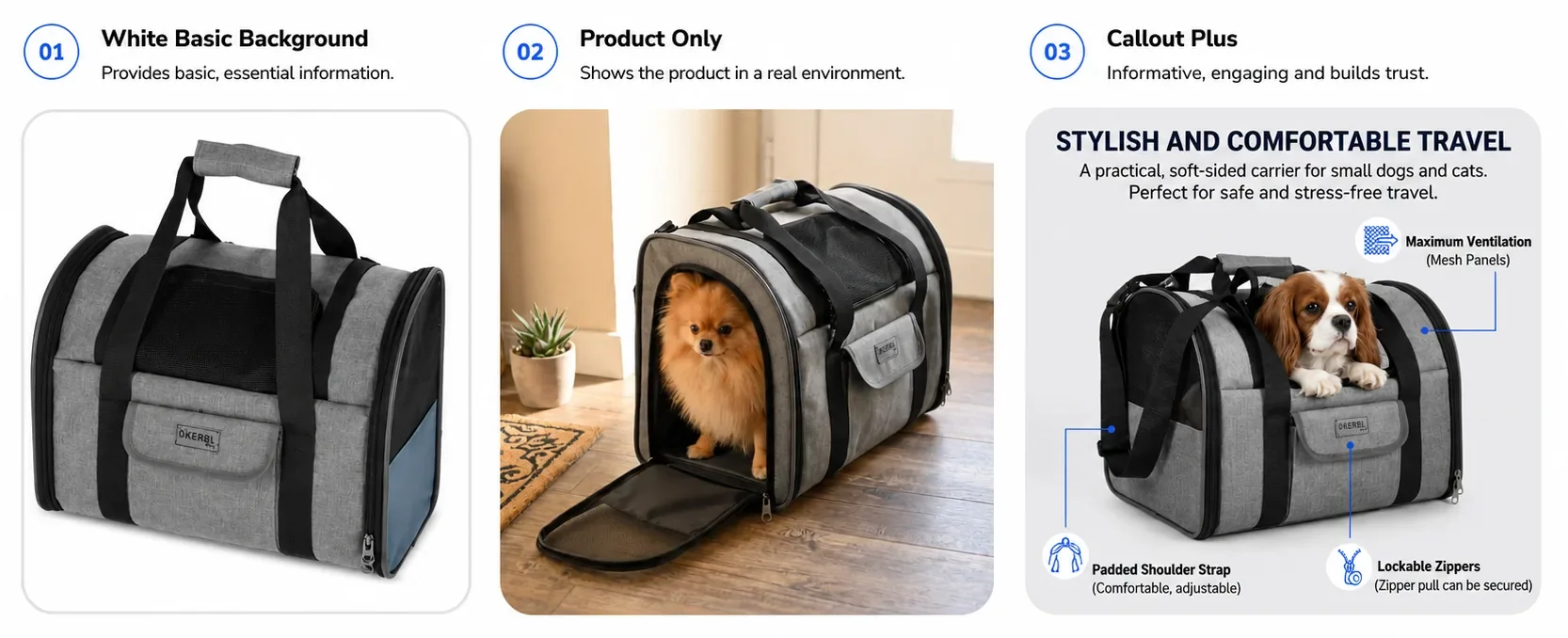
Over 11 days, at $5 a day per ad set, Callout Plus brought 42% more purchases than the white-background ads at a 29% lower cost per purchase, and Product Only reached a 34× ROAS. One store and one test, not a benchmark, but it shows what a designed image does inside a dynamic ad.
OptiQube, our product, generates a designed creative like these for every product in a catalog, and the creatives you approve go to Meta as a paused campaign draft.
How to test static against dynamic
If you are not sure which suits your store, test them side by side.
- Keep the audience and budget the same. Meta's A/B test is the cleanest option, because each person sees only one version.
- Compare like with like. A static ad for one product against a catalog ad for the same product set, not a hero ad against your whole catalog.
- Pick the metric first. Cost per purchase for sales; click-through rate only tells you which one stops people.
- Give it one to two weeks, so each version gets enough results to compare.
Our guide to Meta ad creative walks through Meta's testing tools in detail.
Frequently asked questions
What is a static ad?
A static ad shows everyone the same creative: one fixed image, or a fixed video, with the same text. Static doesn't mean it can't move; it means the ad doesn't change from one viewer to the next. On Meta, a single image ad you design and upload yourself is the most common static ad.
What is the difference between static and dynamic ads?
A static ad is the same for everyone who sees it. A dynamic ad on Meta is built from your product catalog: Meta picks which products to show each person, often the ones they viewed, and fills the ad with each product's image, name and price. One ad can then cover thousands of products.
Are static ads still effective on Facebook and Instagram?
Yes, for the jobs they suit: a launch, a single hero product, a clear offer or a brand message. They are also the fastest way to test a new idea, because you control exactly what people see. They don't scale to a large catalog, which is where dynamic ads take over.
When should I use dynamic ads instead of static ads?
When you have more products than you could design ads for, when you want to retarget people with the products they viewed, or when prices and stock change often. Dynamic ads read all of that from the catalog, so the ads stay current without being rebuilt.
What is the difference between dynamic ads and dynamic creative on Meta?
Dynamic ads pull products from your catalog. Dynamic creative was a separate switch that mixed the images and text you uploaded. In Ads Manager it now says dynamic creative is no longer available; instead you can add up to 10 media to one single image or video ad and let Meta combine them.
Can a catalog ad look like a designed static ad?
Yes. Meta's frames and image templates add a layout around every product photo, and you can also give each product its own designed image in the catalog. The ad stays dynamic, Meta still picks the product, but each person sees a designed creative instead of a plain packshot.
What are good static ad examples for ecommerce?
The product in a scene where it is used, a few callouts for features the photo can't show, benefit badges, a clear sale banner, a collage of the product and its details, and a seasonal version of the same product. The examples in this article show each type.
Should I test static ads against dynamic ads?
Yes, if you are not sure which suits your store. Run both with the same audience and budget, ideally as an A/B test so each person sees only one version, and compare cost per purchase over one to two weeks. Many stores end up using both, for different jobs.
Use both, for different jobs
Static ads tell one story to everyone; dynamic ads show each person the right product. Most stores need both: static for launches, offers and ideas worth testing, dynamic for the catalog that keeps selling. Give the dynamic side a designed image, and the choice matters a lot less.
Browse the ad library for creatives by industry and style, or start for free and generate catalog ad creatives for your own feed.